
Is GPT-6.1 Terra Worth Using as a Creator?
GPT-6.1 Terra is worth trying for a second pass on campaign images and for short drafts built from facts you already have. Start with a task you can check: compare the offer on a graphic with an approved brief, then review the suggested fix. You need a supported Work or Codex account to choose it. A successful image check is not a finished video edit, and it cannot tell you which post will perform best.
01 · CHOOSE THE JOB
Where Terra fits in your workflow
Picture the last check before a sponsored post: the graphic is finished, the brand approved 20% off, and you still need to catch a stale price or an unreadable code. That is a useful starting task because you already know what a correct answer looks like.
OpenAI describes Terra as a model for visual reasoning, computer use, and writing. Its model documentation lists image input and text output; audio and video are unsupported modalities. A connected image-generation tool is a separate capability.
OpenAI: GPT-6.1 Terra model documentation
For a creator, the jobs below are useful starting points. These are ways to scope a trial, not measured productivity gains.
| Your task | Give it | Check yourself |
|---|---|---|
| Check campaign artwork | The image and approved offer | Every price, code, and visible claim |
| Draft a short caption | Product facts and the intended action | Whether every claim is supported |
| Review a screen or layout | A screenshot and the problem to find | The actual app at your target size |
If your next job is a rough cut, prepare a timestamped transcript or shot log and use our AI video editing prompts to define the edit. A readable still cannot show whether a cut lands on the right word or whether captions stay in sync.
02 · FIND THE MODEL
How to access GPT-6.1 Terra
OpenAI lists Terra in ChatGPT Work and Codex for Plus, Pro, Business, Enterprise, and Edu. In ChatGPT, use Work rather than Chat. The launch instructions place it in the model list under Advanced; Enterprise access also depends on administrator controls. UAE inference residency is unsupported.
- Sign in to the account whose plan you intend to use, then open Work.
- Open the model selector, look under Advanced if shown, and choose GPT-6.1 Terra. Confirm the composer shows its name before sending.
- Attach one image and paste the approved facts. Start with a review that leaves the original file untouched.
We could select Terra in one Pro account on the web on October 27, 2026. Model-picker layouts can vary. If it is missing, check your account, plan, and workspace controls before paying for a different plan. Browser and computer actions require their own setup and access.
OpenAI: October 26–30, 2026 product update
Already using Codex? Choose GPT-6.1 Terra in its model selector and confirm the active model. Our test used Codex with gpt-6.1-terra explicitly selected. Developers can also use that model ID through the API; the model page says the Free API tier is unsupported. ChatGPT plan access and API usage are separate checks.
03 · INSPECT THE RESULT
What happened in our campaign-image test
We used an image-generation tool to make two fictional Moss Mug campaign cards. The approved offer was 20% off with code MOSS20. Card A matched it. Card B deliberately said 25%.
Terra received the contact sheet and the approved facts in one request. We asked it to quote visible evidence, give the smallest correction, and admit when it could not read something. The expected answers were recorded beforehand and withheld from the model.
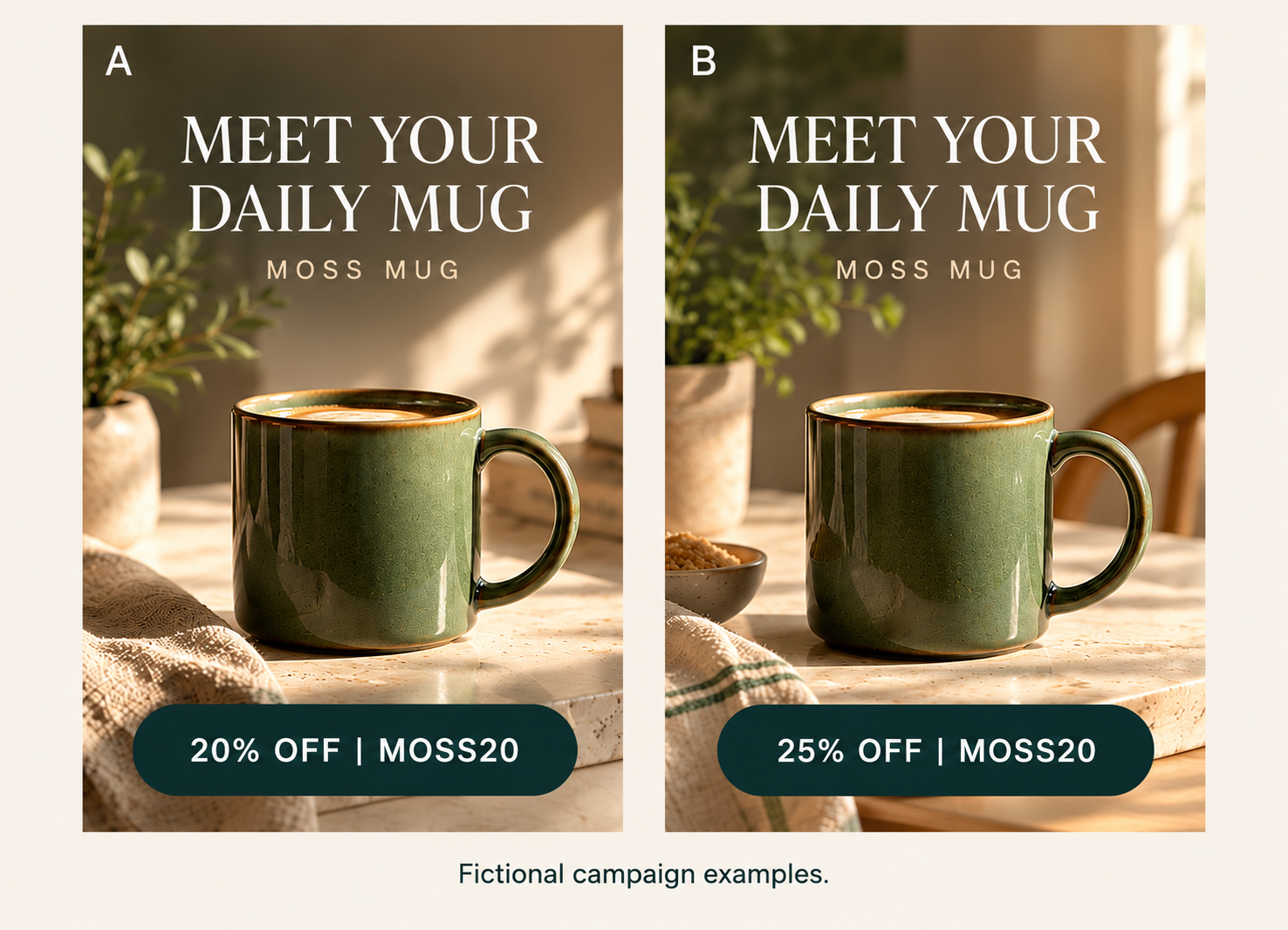
| Card | Terra’s answer | Our check |
|---|---|---|
| A | Ready. Read “20% OFF | MOSS20.” | Matched the visible artwork and approved offer. |
| B | Needs revision. Change 25% to 20%. | Caught the deliberately wrong discount. |
Its caption was: “Meet the Moss Mug. Get 20% off with code MOSS20.” That used only the supplied facts. Both decisions matched our checks, but two deliberately simple cards are too small a test to establish a reliability rate.
The useful behavior was specific: Terra compared the discount against the brief, named the mismatch, and suggested a fix. You still need to check the final artwork before posting.
04 · TRY YOUR OWN IMAGE
Try a review you can check
Choose an image you are allowed to upload and keep the approved brief beside you. Replace the brackets below with exact facts. Label multiple versions A, B, and C so you can trace each comment back to an image.
Review the attached campaign image before posting.

Approved facts:
Product: [name]
Offer: [exact approved discount or price]
Code: [exact code]
Other approved claims: [list, or none]

For each labeled image:
1. Say ready or needs revision.
2. Quote the visible text that supports your answer.
3. Give the smallest correction.

If text is obscured or too small to read, say you cannot verify it.
Do not invent product claims, audience results, or missing text.
Finish with one corrected caption under 35 words using only the approved facts.
Do not edit files or publish anything.
Read the answer against the artwork, not just against its own explanation. A correct discount with the wrong code still needs a fix. If it says text is hidden, inspect the source file or move the text and send a new screenshot; repeating the prompt does not reveal covered pixels.
After making changes, preview the final asset in the app where it will appear. Check the actual crop and interface with your caption in place. The artwork above does not show how your finished post will look inside another app.
05 · KEEP THE FINAL CHECK
What still needs your judgment
A model can check the wrong brief perfectly. You still need to confirm that the offer is current, the brand approved the wording, and you have permission to use the image. Give it the source of truth before asking for a verdict.
This test inspected a single contact sheet. It did not test moving footage, a whole editing timeline, or autonomous work across apps. Use a separate editing pass for timing and sound, and review any proposed computer action before it changes a live asset or publishes a post.
Nor can this result choose the winning creative. A legible offer is one publishing check; audience response needs results from your actual posts. Keep a record of which suggestions you accepted and whether they were correct, rather than treating a confident answer as evidence of likely reach.
Whether Terra is worth keeping comes down to the complete task. Try it on a small batch of work you would otherwise check yourself, then include the time spent supplying facts, correcting mistakes, and verifying the finished file. We did not measure elapsed time, cost savings, or performance against another model. If reviewing its output takes more effort than doing the check directly, reserve it for a different job.
SOURCES
Sources and test method
Product capabilities and access were checked on October 27, 2026. These official pages describe the model and its rollout; check them again if your account’s options differ.
Kabo used an image-generation tool to create the Moss Mug artwork for this example. On October 28, we ran one independent Codex request with GPT-6.1 Terra and medium reasoning effort. It read the image and prompt without the expected-answer file. We then compared the unedited answer with the predeclared checks. The table above condenses the answer for reading.
Inspect the test image, exact test prompt, raw Terra answer, and expected checks. The reusable prompt above adds placeholders for your own campaign; it is not the verbatim test prompt. No real campaign, audience outcome, or cross-model benchmark is represented.