
Feature-by-feature comparison
The feature list makes more sense when you follow the work. Both products cover research and AI-assisted creation, but vidIQ goes deeper around YouTube while Kabo makes more of the creator journey available through one conversation.
| Feature | Kabo | vidIQ |
|---|---|---|
| Trend and outlier research | Yes Ask the agent to investigate public content patterns. | Yes Deep YouTube research plus public Instagram data. |
| YouTube keyword research | Limited No dedicated keyword score or search overlay. | Best Scores, volume estimates and in-YouTube panels. |
| Competitor research | Yes Conversational research on public creators and videos. | Yes YouTube tracking plus public Instagram research. |
| Connected YouTube analytics | No No owner-authorized YouTube Studio analytics. | Best Full analytics for an authorized YouTube channel. |
| AI ideas and planning | Best Ask, refine and change direction in one conversation. | Yes Daily Ideas, AI Coach and MCP support research and planning across YouTube and public Instagram data. |
| Agent-first workflow | Best The conversation is the primary workspace for research, comparison, planning and writing. | Yes AI Coach and MCP support conversational YouTube and public Instagram research and creation. |
| Script writing | Best Carries saved research into hooks and drafts. | Yes AI scripts use the shared creation credit pool. |
| Thumbnail and clipping tools | No No AI thumbnail generator or clipping suite; separate preview, resize and download tools are available. | Best Dedicated AI thumbnail and clipping modules. |
| TikTok research | Best TikTok creators, videos, trends and sounds. | No vidIQ says TikTok is not supported yet. |
| AI-assistant integrations | Yes Creator integrations for Codex and Claude Code. | Yes MCP for ChatGPT, Claude, Cursor and more. |
| Mobile apps | Yes iOS and Android apps focus on mobile creator workflows, including pre-publish feedback. | Yes iOS and Android apps support vidIQ mobile workflows. |
Kabo publishes this comparison, so our preference is visible. Product capabilities come from current product surfaces and official documentation; “best fit” is our editorial judgment. Neither product can guarantee views, followers or revenue.
Trend and topic research
vidIQ helps you explore YouTube, while Kabo starts with a wider field. If every video you make begins with a YouTube search query, vidIQ has the more mature toolbox. Its keyword research shows search-volume estimates, competition and related terms, and its extension puts useful context close to the place where YouTube creators already work.
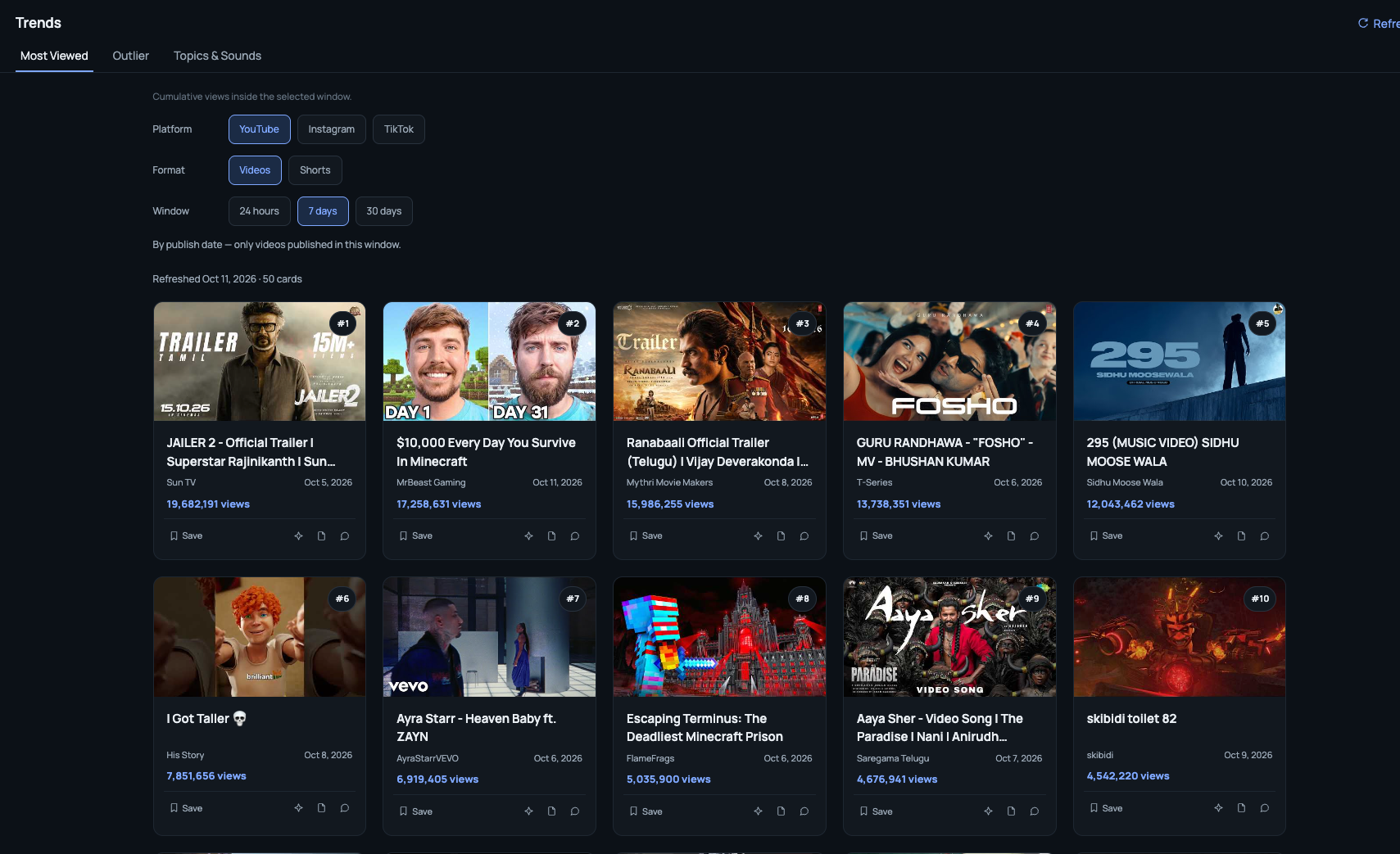
Kabo takes a different route. Its research workspace is built for questions such as: which videos are moving unusually fast, which formats keep appearing, and does the same pattern show up on Instagram or TikTok? You can move between most-viewed content, outliers, topics and sounds while keeping the platform and time window visible.
 Kabo's take
vidIQ has the edge for YouTube keyword research. Kabo is the simpler fit when you want to describe an open-ended question, inspect the evidence and keep asking follow-ups instead of choosing a fixed report first.
YouTube data and optimization
vidIQ still does the YouTube-native jobs Kabo does not try to copy. Connect a YouTube channel to vidIQ and it can work with the owner-authorized analytics for that channel. Its browser extension also brings keyword and optimization information into the YouTube workflow. That matters when your daily job is improving uploads, tracking a channel or working with YouTube-specific signals.
Kabo researches public creators, public videos and the context you provide. It should not be presented as if that public evidence were equivalent to a creator's private YouTube Studio analytics. Kabo also does not reproduce vidIQ's keyword-score panels or position itself as an in-YouTube upload optimizer.
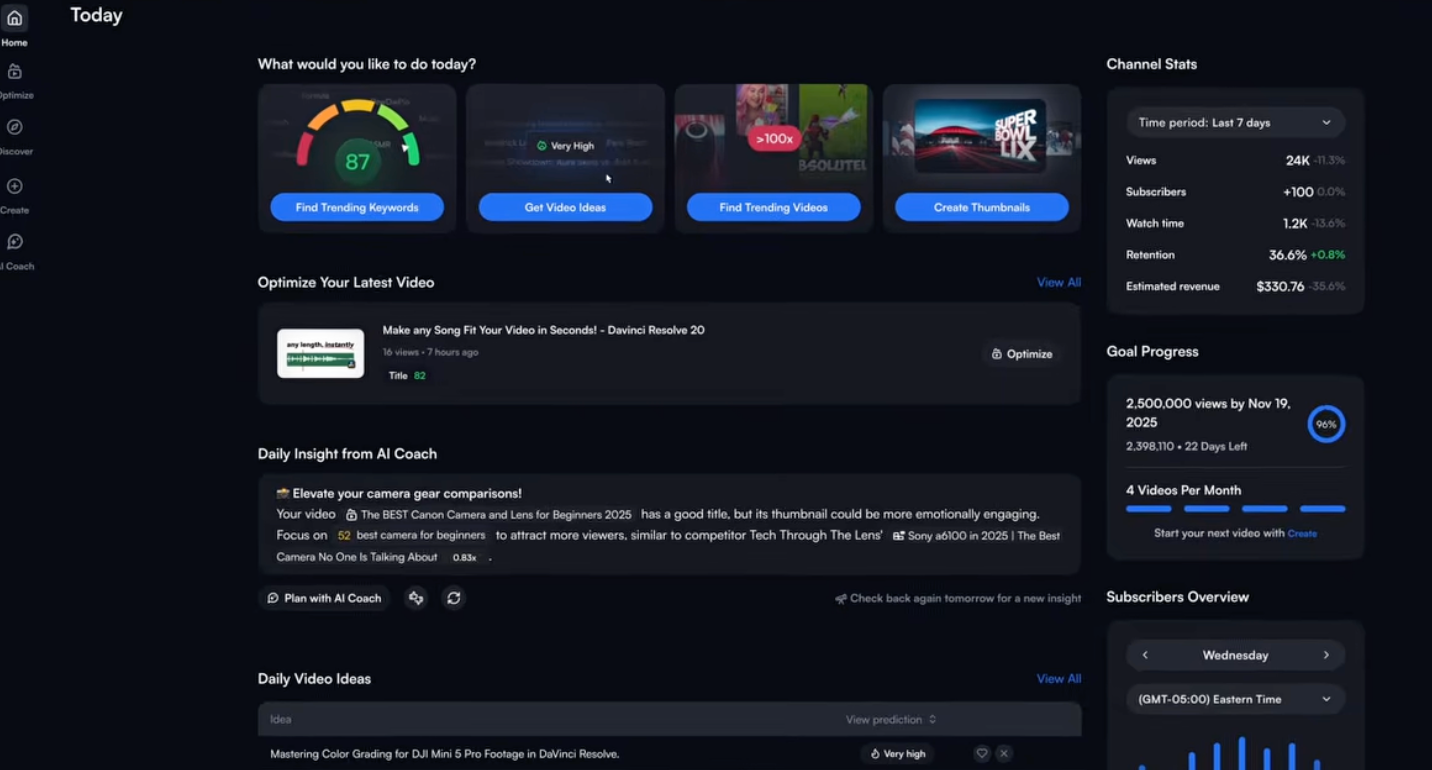
If “better YouTube optimization” is the whole brief, vidIQ is the more direct purchase. Kabo becomes useful when that YouTube evidence is only one part of a larger research and creation process.
A tested task: from rough brief to SEO draft
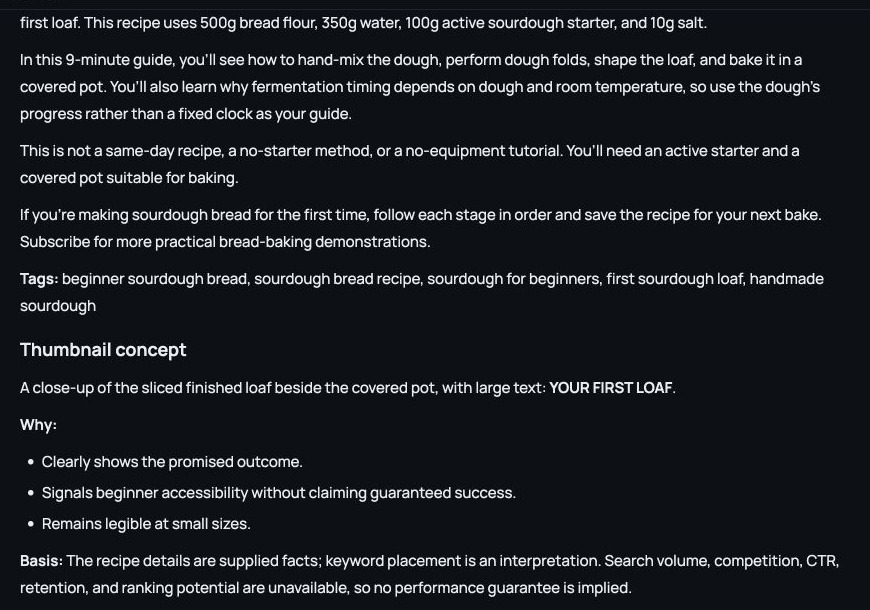
Tested October 15: both agents received the same synthetic brief in Regular mode. Replace “My bread video” for US first-time sourdough bakers using “beginner sourdough bread.” We supplied the recipe and a 9-minute demonstration, ruled out same-day/no-starter claims, and requested three titles under 65 characters, a 120–160-word description, five tags and a thumbnail concept with three reasons.
- 01Give the facts
One brief: audience, query, recipe, runtime and claims to avoid.
- 02Review the title
Kabo: “How to Make Beginner Sourdough Bread by Hand” (44 characters).
- 03Check the package
Three titles, a 135-word description, five tags and a thumbnail concept; the title and description limits passed our checks.
- 04Prepare the edit
The concept pairs a sliced loaf with the covered pot and “YOUR FIRST LOAF.” Review the draft against your footage before publishing.
Kabo gives you an editable package from a plain-language brief. It kept the temperature-dependent fermentation caveat and did not invent volume or ranking scores. For a creator who wants to move straight into writing, that focused conversation is why we recommend Kabo.
vidIQ also completed the package. Its first title was “How to Make Beginner Sourdough Bread (First Loaf)”; it added proprietary keyword estimates and title scores. Both met the requested title/description limits. The scores are not measured CTR or evidence of better rankings. Choose vidIQ if those keyword indicators matter to your review.
Choose Kabo when you want a simple agent you can question, redirect and use for different creator tasks. Choose vidIQ when you would rather have a larger set of YouTube-specific creation and optimization modules.
Platforms and ways to work
Kabo's agent workspace runs in the browser and through creator integrations for Codex and Claude Code. Separate iOS and Android apps support mobile creator workflows, including pre-publish feedback; they should not be treated as identical to the browser agent. Kabo covers YouTube, Instagram and TikTok, although each platform exposes different evidence and actions.
vidIQ also has web, browser-extension and mobile experiences. Its MCP connection works with ChatGPT, Claude, Cursor and other compatible assistants. vidIQ now supports public Instagram profile and Reel research, so “YouTube only” is no longer accurate. Its current MCP documentation says TikTok is not supported yet.
TikTok is the meaningful dividing line today. For assistant integrations and mobile access, both products have a credible story; compare the actual data and next step rather than the number of surfaces.
Free access and pricing
You can try both for free. Kabo has a free plan with daily credits and paid Pro and Ultra plans; vidIQ has a free plan and paid Boost and Max plans.
Kabo
Kabo provides free credits that refresh daily. Its paid Pro and Ultra plans add more credits each day. Prices are listed on the pricing page, so the page is more reliable than a fixed price copied into this article.
Check Kabo pricingvidIQ
vidIQ lists a free plan with 150 monthly AI credits and sells Boost and Max plans. The price changes with billing cycle, region and channel count, so live checkout is more useful than a fixed price copied into this article.
Check live vidIQ plansWho should choose Kabo—and who should choose vidIQ?
Choose Kabo if…
- You prefer asking in plain language to learning dashboards.
- You want to follow up, compare or change direction without starting a new workflow.
- You want the same agent to help with research, analysis, planning and writing.
- You work with creator data inside Codex or Claude Code.
Choose vidIQ if…
- YouTube is your main or only publishing platform.
- Keyword scores and connected YouTube analytics drive your decisions.
- You want optimization tools close to YouTube itself.
- You value built-in thumbnails, clipping, coaching and creator education.
The tools can also complement each other: use vidIQ for private YouTube analytics and keyword work, then ask Kabo to investigate the wider creator question, compare evidence, plan or write.
Kabo vs vidIQ FAQ
Is Kabo a complete replacement for vidIQ?
Not for every workflow. Kabo provides a conversational agent that can move between research, analysis, planning and writing. It does not reproduce vidIQ's mature YouTube keyword scores, extension overlays, connected YouTube analytics, AI thumbnail generation or clipping suite.
Is Kabo or vidIQ better for YouTube?
vidIQ is usually the stronger choice when the job is YouTube keyword research, connected YouTube analytics or optimization inside YouTube. Kabo becomes more useful when you want to investigate a creator question conversationally, ask follow-ups and let the same agent continue into a plan or script.
What is Kabo's main advantage over vidIQ?
Kabo's clearest advantage is its simple, open-ended agent experience. You do not have to choose a fixed report or workflow first: ask in plain language, inspect the evidence, follow up, change direction and let the same conversation continue into planning or writing.
Does vidIQ support Instagram and TikTok?
vidIQ documents public Instagram profile and Reel research through its current product and MCP. Its MCP documentation says TikTok is not supported yet. Kabo supports workflows across YouTube, Instagram and TikTok, with different evidence available on each platform.
Can I use Kabo and vidIQ together?
Yes. A creator could use vidIQ for connected YouTube analytics, keyword research and extension data, then use Kabo as a conversational agent to investigate the wider question, compare evidence and continue into a plan or script.
Sources and method
Product capabilities above are treated as facts only when they appear in a current product surface or official documentation. Conclusions about “best fit” are Kabo's editorial judgment, not independently measured performance claims.
Hands-on case: October 15, 2026, identical synthetic video brief, Regular mode in Kabo and vidIQ AI Coach. Original prompts, outputs and screenshots were retained; character and word limits were checked independently. This was a draft task, with no upload, live A/B test or measured ranking result. The product documentation and pricing review elsewhere remains dated October 12.
- vidIQ features and credits by plan
- vidIQ MCP coverage and limitations
- vidIQ for Instagram
- vidIQ mobile apps
- vidIQ keyword research
- vidIQ plans
- Kabo verified product facts
- Kabo pricing
Sources last checked October 12, 2026. Product documentation, plan limits and regional prices can change after that date.