
At a glance
Which part of vidIQ do you want to replace?
| What you want to replace | Start with | What to check |
|---|---|---|
| Understand why your uploads worked or stalled | YouTube Studio, Morningfame | Your own reports; Morningfame’s guided workflow was not hands-on tested. |
| Find your next topic or format | 1of10, OutlierKit | Check dates and baselines; OutlierKit coverage is documentation-based. |
| Study competitors and reference videos | Viewstats, Social Blade | Public history and coverage differ; private CTR and retention remain private. |
| Develop an angle, hook or script | Kabo | Review sources, factual guidance and draft timing before filming. |
| Improve titles and thumbnails | 1of10, TubeBuddy, YouTube Studio | Reference research, creation and live A/B tests are distinct; access varies. |
| Check keywords and optimize an upload | TubeBuddy | Proprietary indicators; advanced tools required a paid plan in our test. |
Kabo publishes this list and includes Kabo as the final option. The order groups related jobs; it is not a performance ranking. No placement is paid, and no product can guarantee views, followers or revenue.
Why look for a vidIQ alternative?
A creator may need to understand an upload, find a topic, study a competitor, develop a hook, package a video or optimize its metadata. Choose the missing step first. A keyword score, a views chart and a finished script answer different questions.
8 vidIQ alternatives, reviewed one by one
1. YouTube Studio — Understand your own uploads
Best for: Your own reach and retention
YouTube Studio provides first-party reach, retention, audience and eligible revenue reports for channels you manage. Start here when measurement is the part of vidIQ you need.
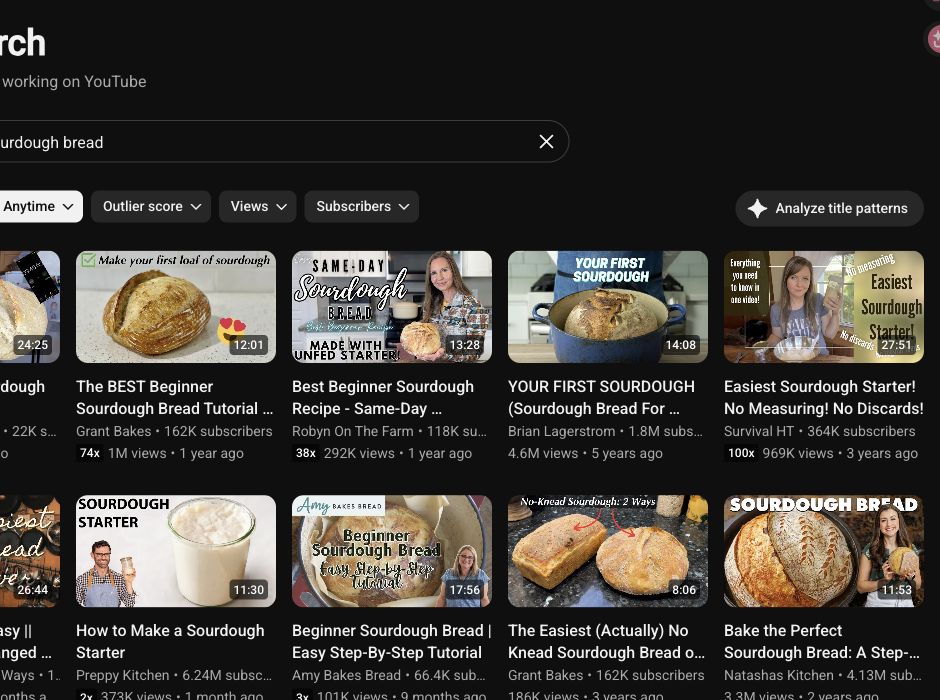
What we found: We opened Analytics and found sourdough references in Research. Native reports are the place to investigate reach, retention and audience; our low-activity test channel could not support a useful retention evaluation.
Main limitation: Other creators’ private reports remain unavailable. YouTube also documents title/thumbnail A/B tests for eligible desktop channels and videos; we did not run a live experiment.
Free with channel access.
Compare free YouTube analytics tools
2. TubeBuddy — Optimize uploads inside YouTube
Best for: Keyword indicators inside YouTube
TubeBuddy combines a YouTube extension with keyword research, SEO guidance and paid testing tools. Choose it when you want dedicated controls around your uploads.
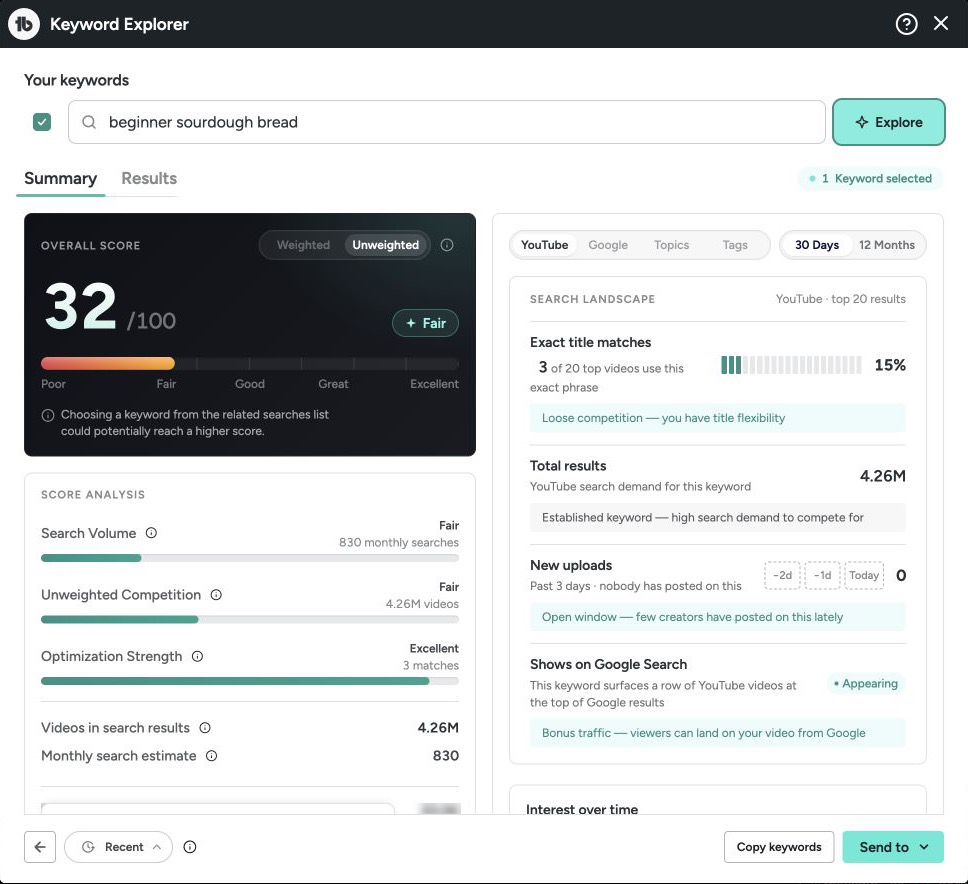
What we found: The shared keyword returned 32/100 (Fair), an estimated 830 monthly searches and three visible related terms. These are proprietary estimates, not verified US search counts.
Main limitation: Weighted keywords and SEO Studio required Pro in our account; paid draft quality was not tested. Annual equivalents were $12 and $26.39/month.
Starter/free access; Pro $15/mo; Legend $32.99/mo.
3. 1of10 — Find topics and packaging references
Best for: Outlier references and title options
1of10 combines outlier and thumbnail searches with AI title and idea tools. Research limits and AI credits are separate.
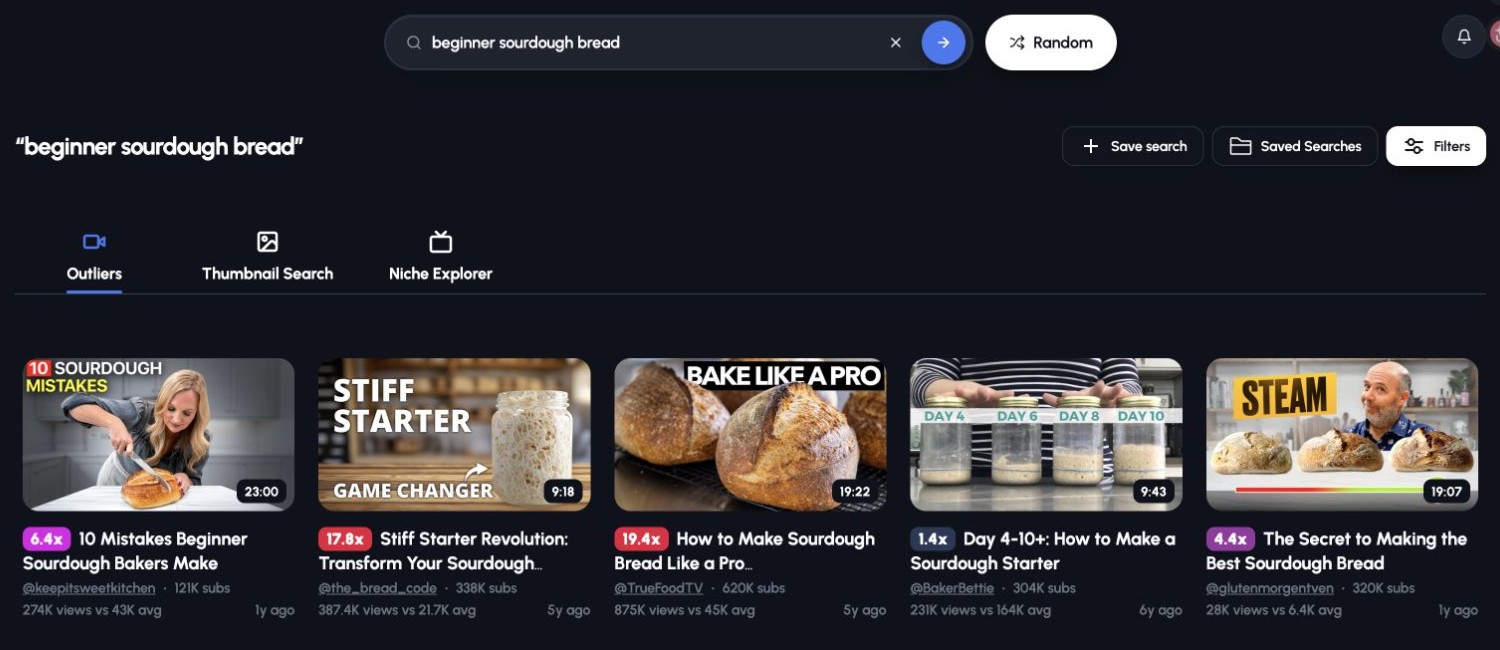
What we found: The sourdough query returned five visible examples with views and channel-average figures. All were shown as 1–6 years old: useful for evergreen formats, but not a fresh-trend shortlist.
Main limitation: Free date filters were disabled. Outlier multiples do not explain why a video worked. Its documented title and thumbnail tools cover packaging; paid results were not evaluated.
Free: 60 AI credits/mo; Basic $15/mo billed annually.
4. Viewstats — Study competitors and video trajectories
Best for: Public channel and video trajectories
Viewstats offers channel histories, Longs/Shorts lists and individual video charts. Pro adds focused outlier and thumbnail research.
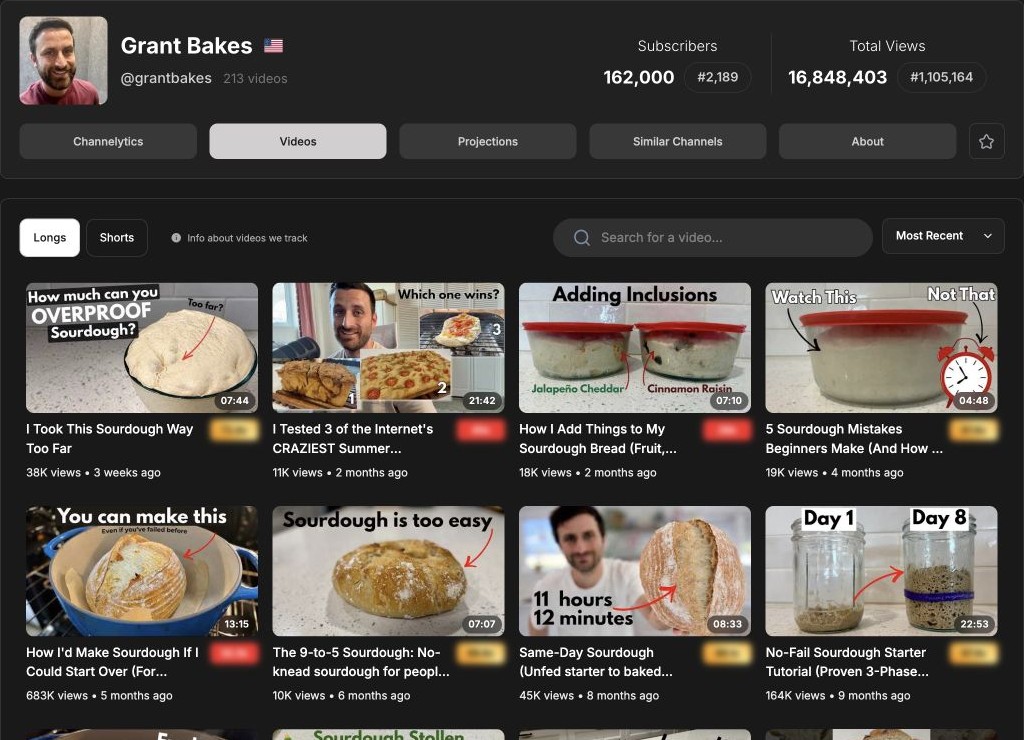
What we found: Free login opened GrantBakes channel history, separate Longs/Shorts lists and similar channels. The shared tutorial had a views chart and 683K views at capture: useful for selecting and tracking a reference.
Main limitation: Outliers and Thumbnail Search required Pro. Its competitor-tracking route returned an error in our session, so those results remain unevaluated; the documented capabilities are still relevant when choosing a plan.
Free account reports; Pro $49.99/mo shown in our session.
5. Morningfame — Get a guided channel review
Best for: Guided channel diagnosis
Morningfame documents a guided approach to channel analytics and keyword research. Consider it when you prefer a narrower sequence of recommendations to a broad creator toolkit.
What we found: Documentation-based: use its guided channel review and keyword workflow when you want help deciding what to improve next. We did not complete a hands-on test.
Main limitation: Signup requires an invitation. Prices above retain our October 12 check; the current pricing page did not return readable text on recheck. Confirm the offer before joining.
One-month trial; Basic $4.90/mo; Plus $12.90/mo.
6. OutlierKit — Research a niche and its content patterns
Best for: Niche and competitor research
OutlierKit documents outlier and keyword research, with script analysis and niche-wide Competitor Studio on its platform. Pro and Max add MCP and API access.
What we found: Documentation-based: channel checks, script/hook analysis and Competitor Studio address different research questions. Deep Research costs 20 credits; the 30-credit trial can sample research, but not every module.
Main limitation: Niche-wide Competitor Studio costs 50 credits and requires Pro or Max. We did not evaluate its output quality. Annual Hobby pricing was rechecked October 15.
30-credit trial; Hobby $299/year ($24.92/mo shown).
7. Social Blade — Track public channel growth
Best for: Public totals and historical charts
Social Blade tracks public account totals and history across several platforms. Use it for a quick activity check rather than SEO or script creation.
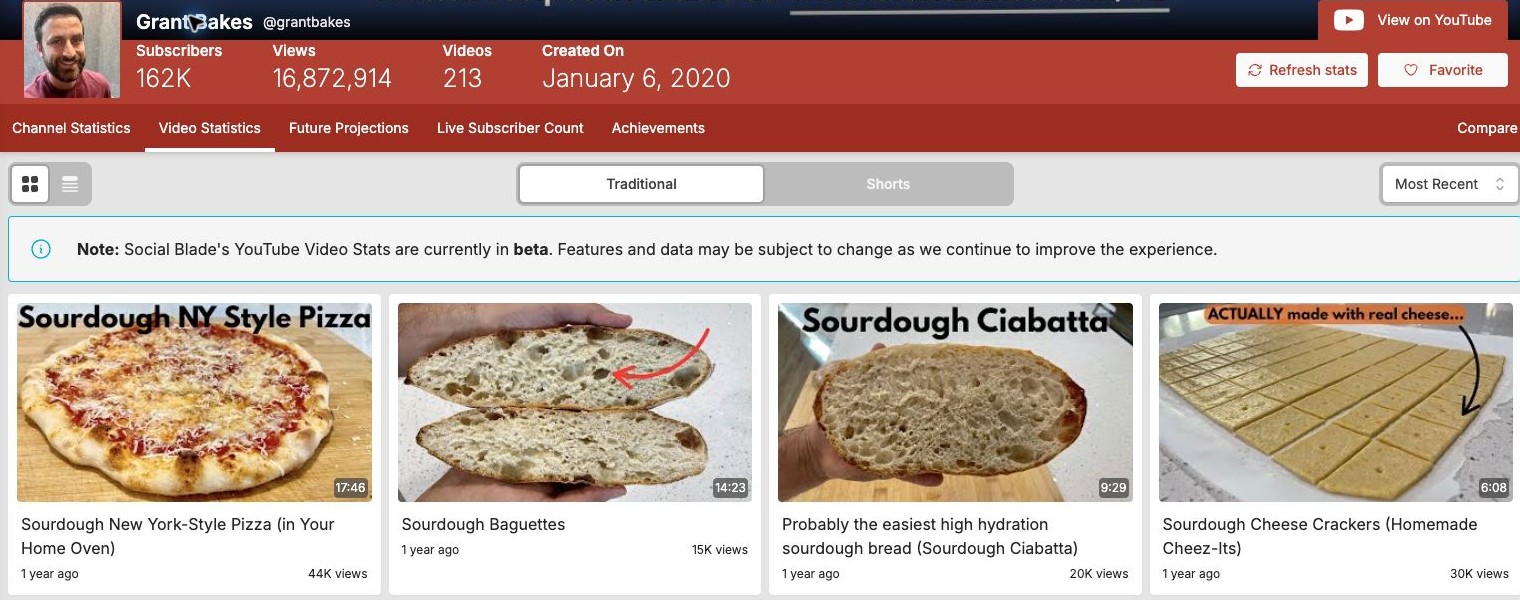
What we found: The shared channel returned public totals and history; free login also opened 52 videos. Most Recent began with an older upload, so use the history for a broad check and verify coverage before studying current topics.
Main limitation: Our first video-detail page did not load data. Public counts and estimates cannot reveal private CTR, retention or actual income.
Free; Bronze $59.99/year.
8. Kabo — Turn research into ideas and scripts
Best for: Research, analysis and writing in one conversation
Kabo is our recommendation for an easy AI Agent conversation that can investigate creator questions, analyze evidence and continue into ideas or writing.
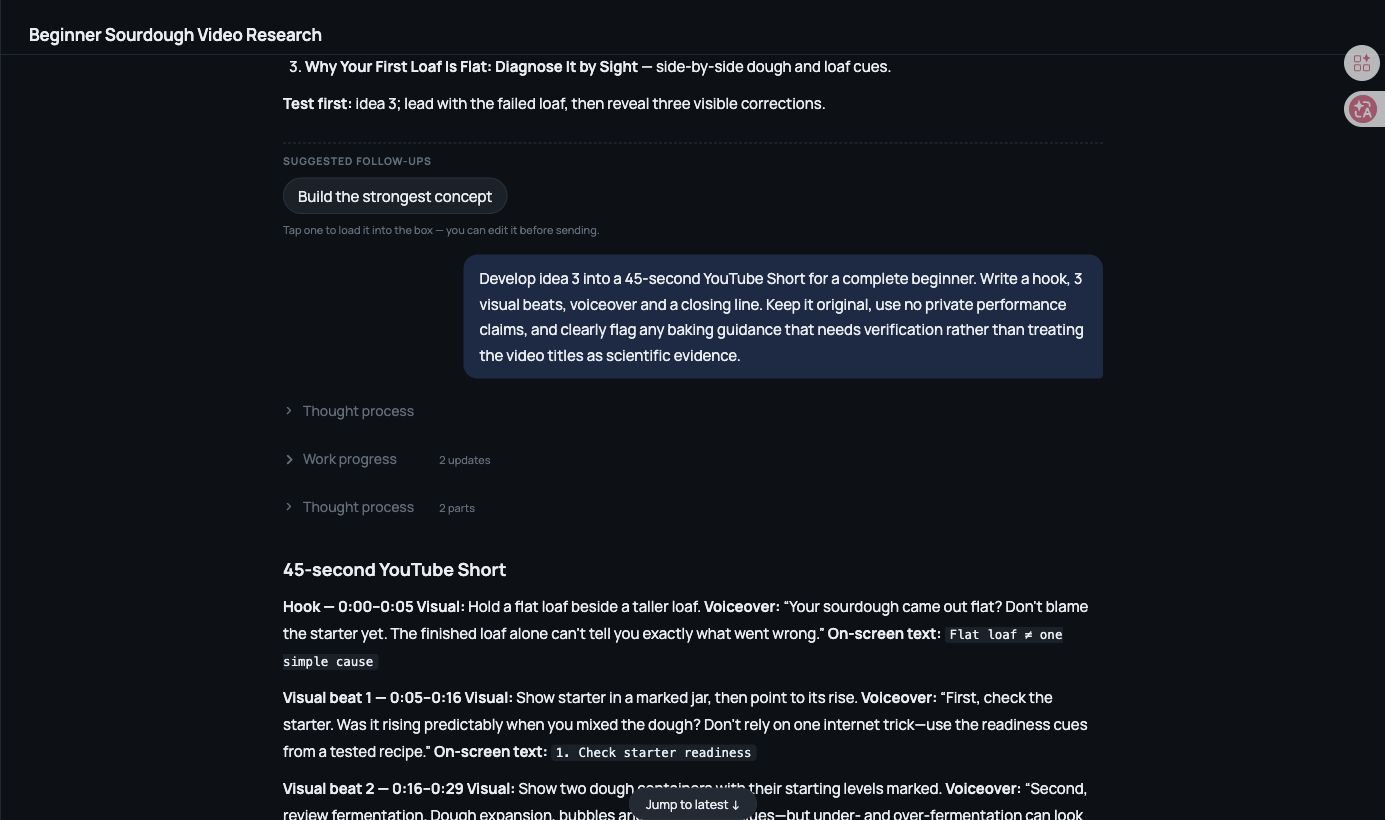
What we found: In our October 14 conversation, three public sourdough references led to three original angles. We selected “Why Your First Loaf Is Flat: Diagnose It by Sight,” then asked for a Short. Kabo returned a hook, three visual beats, voiceover and a closing line without starting over.
Main limitation: The proposed 45-second script still needs a timed read-through and baking guidance needs verification. Review sources and samples: a separate channel analysis used 100 uploads despite our requested maximum of 20.
Free daily credits; paid Pro and Ultra plans.
 Kabo's take
Keep measurement. Replace the part that slows you down.
Keep Studio for your own results. We recommend Kabo when research needs to become a decision, an idea or a script. Add a specialist for the work you repeat: Viewstats for public trajectories, 1of10 for reference discovery or TubeBuddy for upload optimization.
What we actually tested
On October 15, 2026, we used “beginner sourdough bread,” GrantBakes and the same public tutorial wherever supported. Kabo received the full briefs in Regular mode; native tools received matching keyword or URL fields. Studio used our own authorized, low-activity channel. The continuous Kabo research-to-script task was captured October 14.
Original inputs, results and screenshots were retained. We did not purchase plans or measure publishing outcomes. Morningfame and OutlierKit descriptions use public documentation, not hands-on results. Scores, free limits and sample coverage are interpreted within each tool’s actual scope.
Frequently asked questions
vidIQ alternatives FAQ
What is the best free alternative to vidIQ?
Start with YouTube Studio for your own performance. Try Viewstats or Social Blade for public reports, 1of10 for capped outlier research, and Kabo for discussing findings and drafting ideas.
What is the closest direct alternative to vidIQ?
TubeBuddy is a close fit for a YouTube extension, keyword indicators and testing. Kabo is our pick when the priority is an easy conversation that continues into research, analysis and writing.
Can YouTube Studio replace vidIQ?
For first-party reports, start with Studio. It also documents title/thumbnail A/B testing for eligible channels and videos. It does not replace every external research, competitor or writing workflow.
Which option supports YouTube, Instagram and TikTok?
Kabo supports research across all three, with different evidence available per platform. Its main appeal here is how easily a research question can continue into an analysis or draft.
Is Kabo a direct vidIQ replacement?
Kabo can be your main workspace for research, analysis, ideas and writing. Our continuous test moved from public references to a Short script. Keep a specialist for keyword indicators, extension controls or live A/B experiments.
Official sources
Check current limits before you subscribe.
- YouTube Studio
- TubeBuddy
- 1of10
- Viewstats
- Morningfame
- OutlierKit
- Social Blade
- Kabo
- YouTube title and thumbnail A/B testing
- vidIQ features and credits by plan
- vidIQ MCP coverage and limitations
Sources rechecked October 15, 2026, except Morningfame pricing retained from October 12 and flagged above. Prices are USD and billing cycles differ. Free limits, public counts and offers can change; paid output quality was not evaluated.