
Kabo vs Viewstats at a glance
Start with the task you need to finish for your next video.
| Task | Kabo | Viewstats |
|---|---|---|
| Channel analysis | Interpretation Find recurring topics and discuss what to make next. | History Public totals, growth charts and individual uploads. |
| Video analysis | Content context Discuss a video’s content using available source material. | Performance context View history and typical-performance comparisons. |
| Outlier discovery | Conversational research Investigate examples through a question and source links. | Dedicated Pro tool Filter a research library by topic and performance. |
| Thumbnail research | Creative direction Develop a title and thumbnail brief. | Visual workspace Search thumbnails and save references in Collections. |
| Ideas and writing | AI Agent Continue from analysis into ideas and editable drafts. | Reference planning Organize inspiration and preview packaging combinations. |
| Platform coverage | YouTube, Instagram, TikTok Useful when your creative work spans platforms. | YouTube focus A research workspace centered on YouTube. |
Channel and video analysis
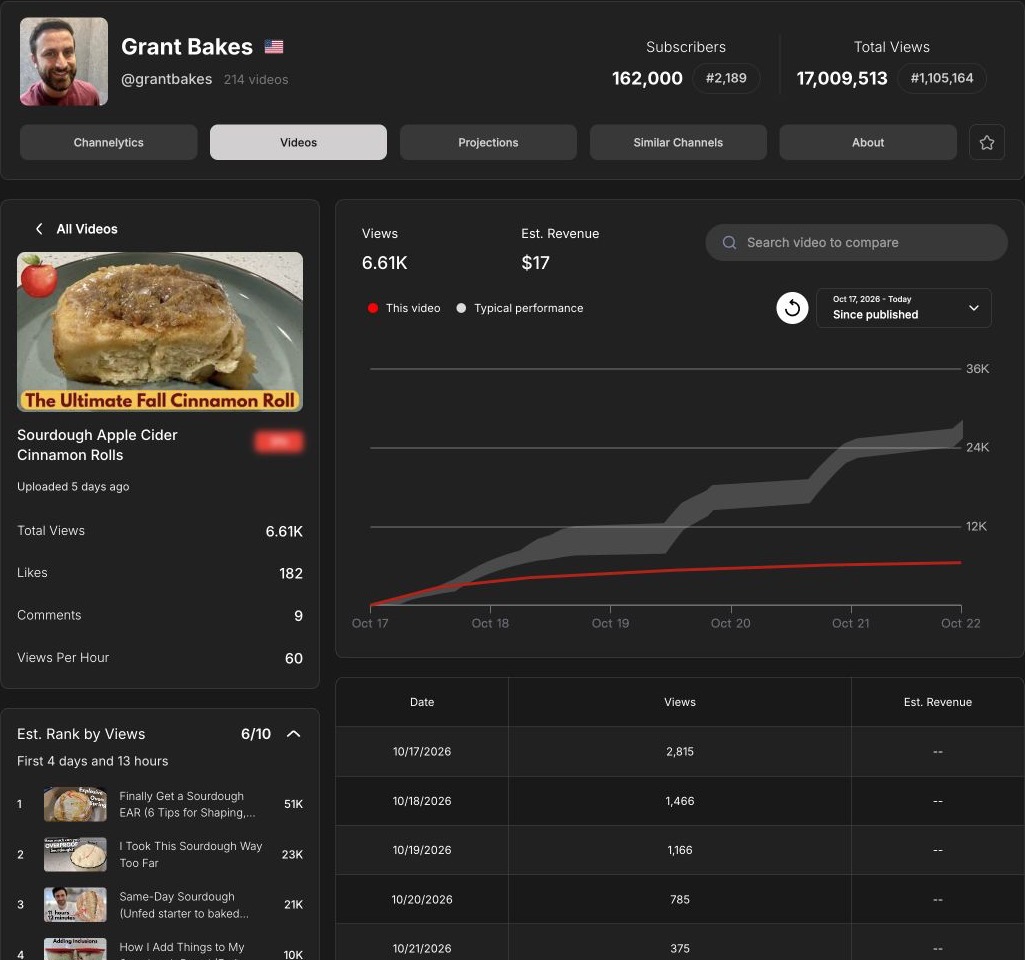
Viewstats suits questions such as “Is this channel growing?” and “How did this upload perform in its first few days?” Its free reports show channel history, separate Longs and Shorts lists, and individual video performance. On GrantBakes, a cinnamon-roll video’s view curve appeared alongside a typical-performance band and a ranking at the same time since publication. That comparison is more useful than judging a new upload against an older video’s lifetime views.
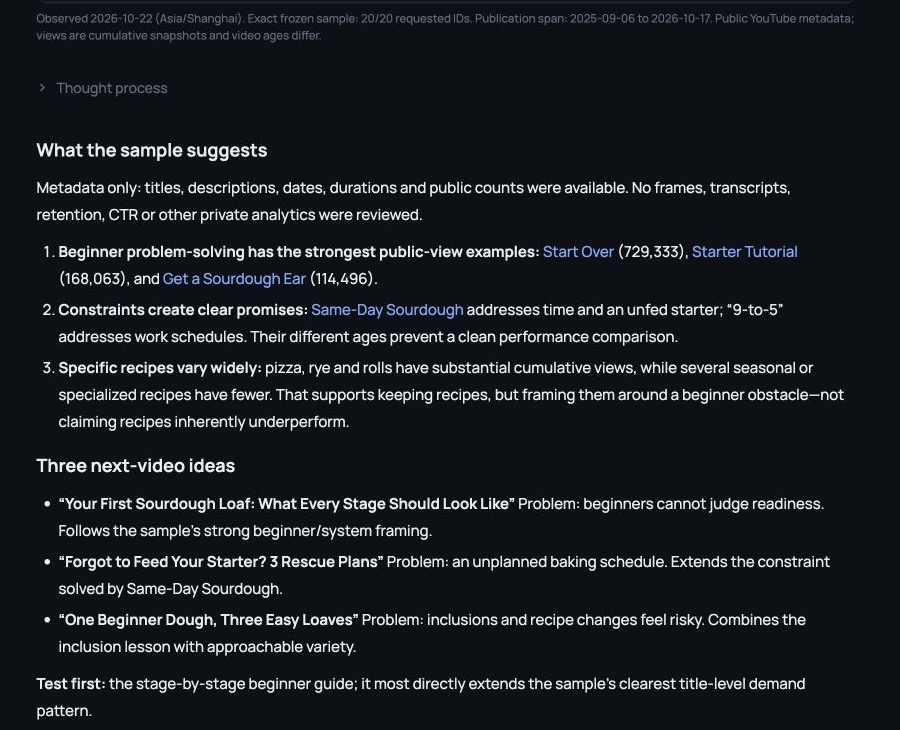
Kabo suits a different question: “What can I learn from this channel for my own videos?” Its account analysis can help identify recurring topics, formats and audience problems. In the GrantBakes example, titles about beginner mistakes, starting over and baking around a work schedule suggested two directions: solving beginner problems and addressing practical constraints.
For one reference, YouTube video analysis lets you narrow the discussion to the content. Ask what problem it addresses, how its promise could fit your audience and what source material supports the answer. Check what was actually analyzed: metadata can suggest a topic pattern, but cannot establish how an opening scene or spoken hook works.
Outliers, thumbnails and packaging
Viewstats Pro is a strong fit when research means scanning many videos and thumbnails. Its Outliers tool provides filters including upload date, views and channel size. Thumbnail Search accepts searches, video links or images. Collections organizes references and previews title/thumbnail combinations. Build a visual reference board before deciding on packaging.
Kabo helps turn a reference into a creative brief. You might ask, “Which part of this promise could work for beginner bakers with limited equipment?” Then develop a title and thumbnail direction around that constraint. It is useful for discussing choices; Viewstats offers the dedicated browsing interface for building the reference set.
For live testing, note that Viewstats’ app notice says its A/B test tool retired on June 29, 2026. Thumbnail research and packaging previews do not establish which version will earn more clicks.
From references to ideas and scripts
Kabo’s AI Agent lets you carry a research question into the next creative step. In the 20-video GrantBakes sample, it connected beginner problem-solving with an idea: “Your First Sourdough Loaf: What Every Stage Should Look Like.” The audience problem was concrete: beginners struggle to judge when dough is ready.
From there, you can ask follow-up questions in the conversation: “Why this direction?”, “How would it change for someone baking after work?” or “Give me three angles I can film in a small kitchen.” Use these follow-ups to refine a direction around your audience and production limits.
Once you choose an angle, ask for an outline, then an opening and shot notes. In a separate reference-to-script conversation, Kabo moved from two video references to original ideas and a script with shot notes. Content planning connects that writing work with the research brief. You still need to check factual claims and add your own experience.
Viewstats helps you assemble inspiration and preview packaging. Kabo is the more relevant choice when your next task is to discuss the references and write from them.
Free access and pricing
Kabo offers free daily credits. Its plans displayed Pro at $7.99/month on October 22. Start with a specific analysis question to judge whether the output helps; task size and plan allowances affect how much you can do.
Viewstats offers free channel and video reports. Pro is $49.99/month; Outliers and Thumbnail Search required an upgrade on the account checked. The current official billing article describes monthly billing.
For occasional performance lookups, free Viewstats may be enough. Consider Pro for frequent outlier and thumbnail research, or Kabo’s paid allowance if analysis and drafting are the tasks you repeat. Compare the work each subscription covers.
Which should you choose?
Choose Viewstats when your main output is a shortlist of promising YouTube references, a thumbnail board or a comparison of upload performance.
Choose Kabo when your main output is a decision about what to make, followed by a brief or script. Its YouTube, Instagram and TikTok coverage also supports creator research across platforms.
Use both when you want Viewstats for discovery and performance context, then Kabo to develop a reference into something suited to your audience. Bring the video URL, your audience and filming constraints into the conversation.
Kabo vs Viewstats FAQ
Is Kabo a full replacement for Viewstats Pro?
Choose by task. Kabo supports analysis, ideas and drafting; Viewstats Pro provides dedicated outlier and thumbnail research tools. Keep Viewstats if those browsing workflows are essential.
Can either tool reveal a competitor’s private analytics?
Public research does not reveal private impressions, CTR or retention. Use authorized first-party reports for accounts you manage; public observations answer a different question.
Sources and method
Published by Kabo. The October 22 channel example used 20 supplied GrantBakes links and public metadata, without frames or transcripts. It demonstrates analysis and ideas, not automatic discovery of the latest uploads. Script evidence comes from a separate October 21 conversation. Viewstats free reports were checked directly; Pro research features follow official documentation. Original inputs, outputs and screenshots are retained.
USD prices checked October 22, 2026. Access and allowances can change. Recommendations are editorial judgments, not promises of views, CTR or income.