
Why look for a Viewstats alternative?
Viewstats combines free performance reports with paid visual research. Look elsewhere when you need a different discovery workflow, a competitor map, keyword research or help developing an original idea. Identify which part you want to improve: another analytics dashboard may add little if your actual bottleneck is deciding what to make.
Choose a Viewstats alternative by the job
| Job to replace | Tool | Useful output | Free access / starting price |
|---|---|---|---|
| Outlier and thumbnail discovery | 1of10 | A visual shortlist with original video links | Limited Free; Basic $19/month |
| Niche and format research | TubeLab | Filtered references and related content patterns | Sample browsing; Starter $29/month |
| Competitor and niche mapping | OutlierKit | A competitor landscape built around a channel | 30-credit trial; Studio needs Pro $99/month |
| Topic and keyword research | vidIQ | Keyword ideas, related topics and AI guidance | Free plan; Boost $19/month |
| Public channel statistics | Social Blade | Growth history, rankings and account summaries | Free lookup; Bronze $5.99/month |
| Analysis to an original video brief | Kabo | A conversation with evidence, ideas and a script | Free credits |
6 Viewstats alternatives for YouTube creators
1. 1of10 — outlier and thumbnail research
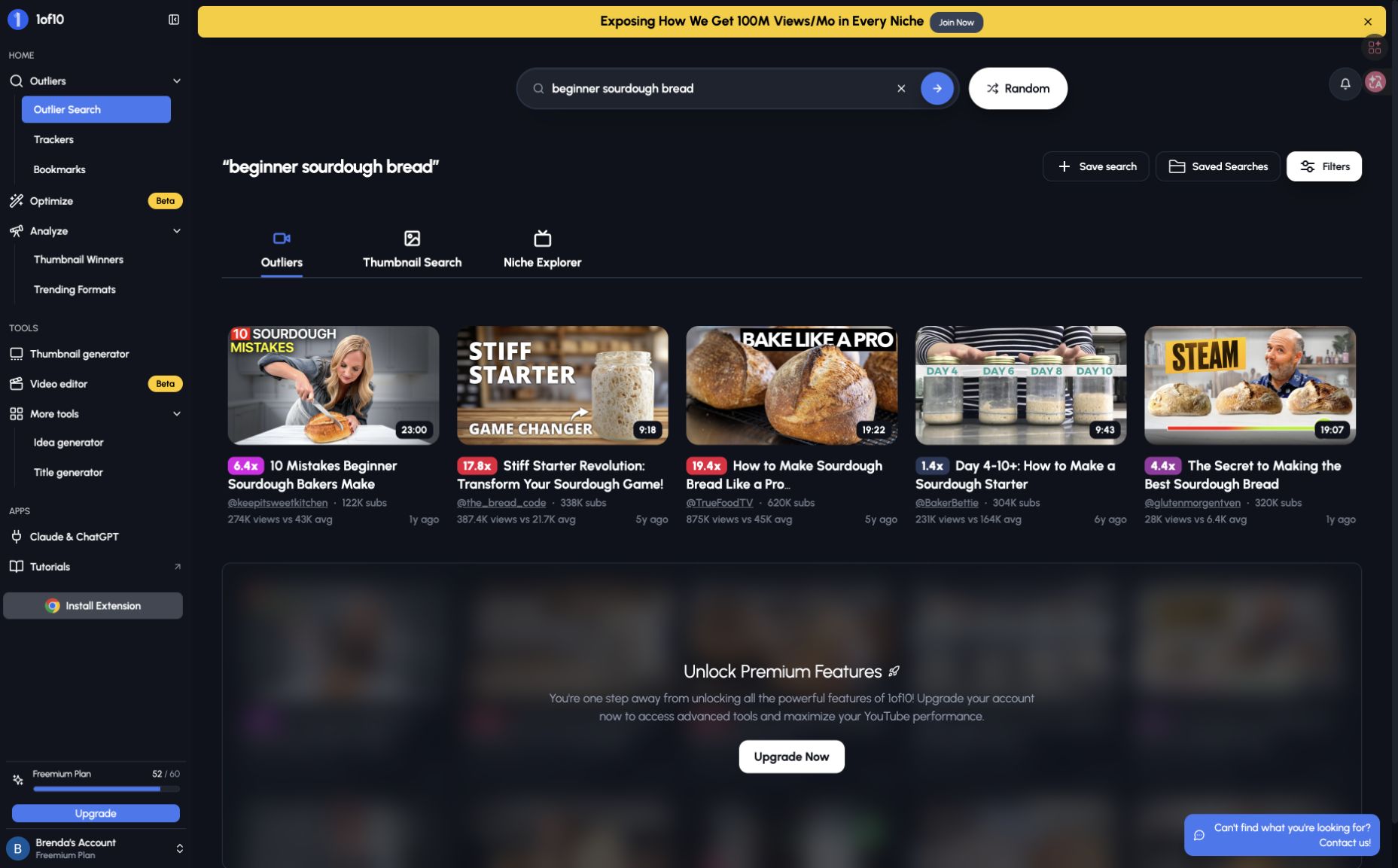
1of10 suits creators who open Viewstats Pro to collect title and thumbnail references. Video cards combine views, channel-average comparisons and an outlier multiplier; Thumbnail Search supports visual browsing. Choose it over a broader niche workspace when your immediate goal is a reference shortlist.
A beginner sourdough search gave us five readable results from different channels, including mistakes lists and starter techniques. They were useful packaging examples, but the videos were older: this free preview would not establish what is trending now. Publication-date filtering required an upgrade. Multipliers indicate relative performance, not what caused it.
Basic costs $19/month, or $180/year, with 150 monthly AI credits. The limited Free plan lets you try browsing; check research filters separately from AI allowances. For upload optimization instead, see the TubeBuddy alternatives.
2. TubeLab — niche and format research
TubeLab is the stronger fit to consider when your question is “Could I build a channel or series around this?” Its Niche Finder, Outliers Finder and Trending Formats group niche exploration with video references. Where 1of10 suits assembling a visual shortlist, TubeLab’s appeal is a broader workspace for investigating repeatable content directions.
The official overview also describes AI ideation and scriptwriting. Starter includes limited filters; Pro includes the full set. Our account could browse samples but could not run the paid search, so we cannot compare its matched-query results with 1of10.
Starter was $29/month; Pro displayed a promotional $39/month against a $49 list price. Choose based on the filters you need, not the sample cards alone. For occasional reference gathering in an established niche, a broader workspace may be unnecessary.
3. OutlierKit — competitor and niche mapping
OutlierKit addresses a different starting point: you know one relevant channel and want to map its competitors. Its Competitor Studio is positioned around building that landscape, alongside separate outlier, keyword and video tools. Consider it over a video library when identifying which channels to study is the immediate problem.
This recommendation follows official documentation, not a completed hands-on task. Its FAQ warns that very small, new or children’s channels can return thin results, so check suitability for your niche.
Competitor Studio requires Pro or Max and costs 50 credits per run. Pro displayed $99/month with 500 monthly credits, or $599/year. The cheaper Hobby plan does not unlock Studio, and the 30-credit no-card trial cannot cover a Studio run. That restriction matters more than the headline entry price.
4. vidIQ — topic and keyword research
vidIQ fits creators whose next question is what viewers search for and how to prepare an upload. Keyword research, trends, optimization and AI Coach make it more relevant to topic selection than a tool chosen primarily for browsing thumbnail references. It also offers idea and thumbnail tools, so AI alone is not the differentiator.
Choose it when keywords and upload preparation are recurring needs. If you mainly want to scan a visual reference board, start with 1of10 or TubeLab instead. Our vidIQ alternatives guide covers those adjacent workflows.
Plans include a limited Free tier. Boost showed $19/month for one channel with 2,000 monthly AI credits. Research and AI allowances vary by plan; a free account does not provide unlimited access to every tool.
6. Kabo — account analysis to an original video brief
Kabo suits creators who have references but need help deciding what to make. Give its AI Agent a public channel or video and a question. Account analysis can examine recurring formats and content patterns; YouTube video analysis can unpack a specific reference. See Kabo vs Viewstats for the direct workflow comparison.
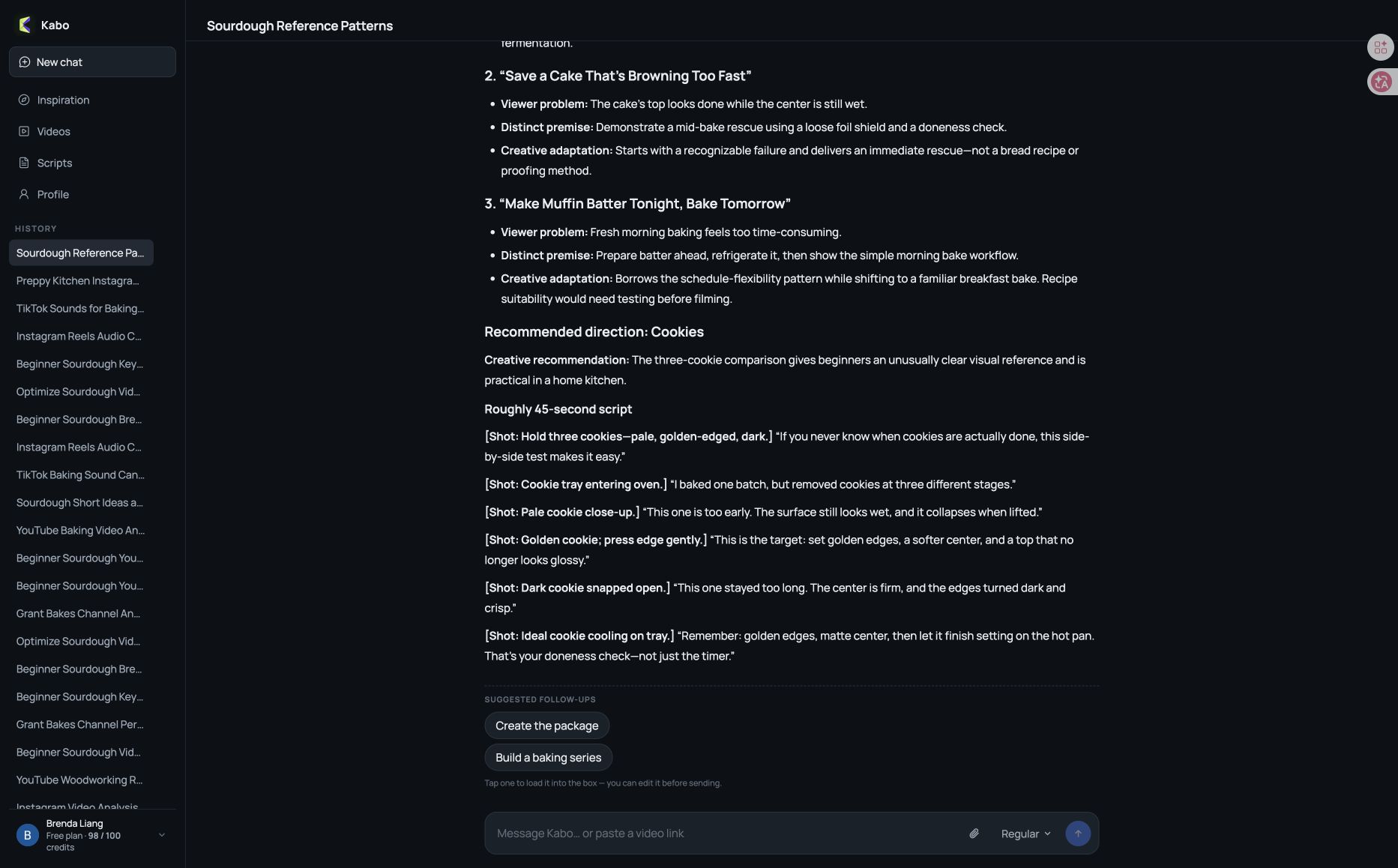
In our sourdough example, Kabo drew beginner pain points, readiness cues and flexible schedules from two references. A follow-up produced three original baking directions, then a cookie-doneness comparison script with shot notes. The useful result was a transferable teaching approach applied to a different bake, with a draft ready for editing.
Choose Kabo for an easy conversational path from analysis to writing. Choose a dedicated library when browsing many outliers is the main task. It can analyze channels, but cannot access competitors’ private CTR or retention, and does not replace a historical statistics dashboard.
Content planning continues from the research. Free credits are available; check your account allowance for larger tasks.
When Viewstats Free or YouTube Studio is enough
Keep Viewstats Free if channel totals, Longs/Shorts lists and video histories already answer your question. Viewstats Pro, at $49.99/month when checked, is a separate purchase for deeper research. A similar-channel search may fill a narrower gap.
Use YouTube Studio for impressions, CTR and retention on accounts you manage. Public competitor tools cannot supply those private metrics. For actual packaging experiments, Studio’s native title and thumbnail tests are available for eligible long-form videos and accounts. Viewstats’ app notice says its A/B tool retired on June 29, 2026. Check Studio eligibility before buying a research library specifically for testing.
Viewstats alternatives FAQ
What is the best free Viewstats alternative?
Social Blade suits public statistics; 1of10 Free offers limited outlier browsing; Kabo’s free credits support analysis and creative follow-ups. None replaces every Viewstats Pro feature. Keep Viewstats Free if its channel reports already meet your needs.
Which alternatives are closest to Viewstats Pro?
Start with 1of10 for visual reference gathering or TubeLab for niche and format exploration. Consider OutlierKit when mapping competitors matters more than browsing individual videos. Compare the paid filters and task costs you actually need.
About this review
Reviewed October 21, 2026, using archived evidence and a focused follow-up. Viewstats Pro and TubeLab’s paid search were unavailable; OutlierKit is documentation-based. Kabo’s conversation reused two archived video references. Official sources support pricing and untested features; hands-on examples illustrate workflows rather than establish an accuracy ranking.
Published by Kabo, which is included in this guide. The order groups related tasks; it is not a performance ranking. Prices, promotions and account limits can change.
5. Social Blade — public channel statistics
Social Blade suits public channel checks: growth history, rankings and account summaries. It also covers Instagram, TikTok, Twitch and Facebook. Choose it for a quick statistical lookup; it does not substitute for Viewstats Pro’s visual outlier and thumbnail research.
Keep Viewstats if its separate Longs/Shorts lists and individual video histories are what you use most. Social Blade can add context to a competitor shortlist, but you will still need to inspect the original videos to understand their creative approach. For your own account’s metrics, see the free YouTube analytics tools guide.
Free lookup is available; Bronze was $5.99/month, or $59.99/year. Check the historical period visible on the report you need before paying. Earnings ranges are estimates, not actual creator income.