
Choose an AI tool for each step of your workflow
You do not need all six. One app may cover several stages; add another only when it solves a recurring bottleneck.
| Workflow stage | Tool | Free path | Main limit |
|---|---|---|---|
| Write and revise the script | Claude | Free account with usage limits | More usage requires a paid plan |
| Plan visuals and make graphics | Canva | Free account; limited shared AI usage | AI allowance and premium assets are separate constraints |
| Record optional synthetic narration | ElevenLabs | 10k credits/month | Free output is for noncommercial use |
| Edit the main recording | Descript | 60 media minutes/month; limited AI | One-time AI credits; 720p export with watermark |
| Repurpose the finished recording | OpusClip | 60 credits/month | Watermark, no editing, three-day export window |
| Review references and plan the next video | Kabo | Signed-in Agent; daily credits | Research and follow-ups use available allowances |
Published by Kabo. Recommendations reflect the task and access conditions, without an overall performance ranking.
From your first script to your next content idea
Claude: shape and revise a script from your brief
Claude helps when you have the facts and message but need a clearer script. Supply your notes, audience and tone, then ask for a specific revision: shorten the opening, simplify an explanation or remove an unsupported claim. A YouTube script generator can supply a first structure; use conversation to revise it and a read-through to check timing.
Free path and pricing: The Claude Free plan costs US$0 and requires an account. Usage limits apply. Pro is US$20 billed monthly or US$200 billed annually, displayed as approximately US$17/month.
Canva: turn an idea into a thumbnail and social graphics
Canva combines AI assistance with layouts, text and manual editing for thumbnails, covers and supporting graphics. Choose it when you want to finish the visual in the same place you generate it. Use your own material or clearly free assets for a free result, and check readability at thumbnail size.
Free path and pricing: Canva Free is US$0. Its shared monthly AI allowance supports up to about 20 Standard or Premium uses; complex tasks or mixing tools can reduce that number. Free excludes Ultra AI. Pro was listed at US$144/year. Check asset licenses as well as the plan before using a design commercially.

ElevenLabs: turn a finished script into a voiceover
ElevenLabs suits a finished script that needs synthetic narration. Start with a supplied voice, then listen for pronunciation of names, numbers and technical terms. Revise sentences that are hard to follow aloud. For monetized or client work, the Free plan’s license is the deciding constraint.
Free path and pricing: The ElevenLabs Free plan includes 10k credits/month. Under the official publishing conditions, free-generated output has no commercial license and requires attribution when shared noncommercially. Starter is US$6/month with 30k credits and commercial licensing, subject to the applicable terms. Subscribing later does not retroactively license earlier free output.
Descript: edit a recording through its transcript
Descript suits tutorials, interviews, podcasts and talking-head videos. Its text-based editing workflow lets you edit a recording through its transcript, with captions and assistance for cleaning up speech or removing retakes. Review cuts in playback to preserve deliberate pauses. Its clipping features may also cover occasional short excerpts.
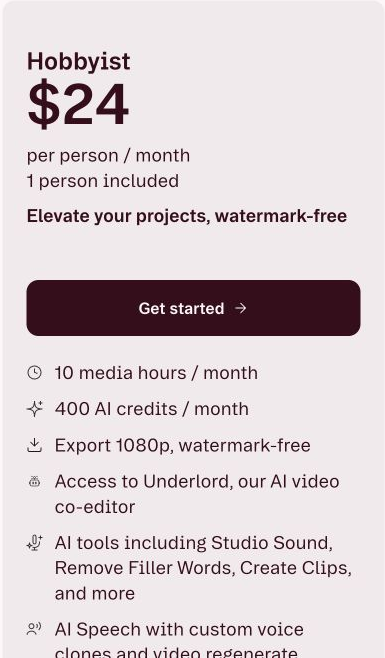
Free path and pricing: The Descript Free plan includes 60 media minutes per month and 100 AI credits once, with 720p watermarked exports. Hobbyist costs US$24/month or US$16/month with annual billing, and adds 1080p watermark-free export. Media minutes and AI credits are separate allowances.
OpusClip: repurpose long recordings into short clips
OpusClip helps turn an existing long recording into several short versions through AI clipping, reframing and captions. Choose it when finding and packaging excerpts is a recurring task. Check that each clip makes sense without the surrounding conversation; its Virality Score is a product signal, not a prediction of your audience’s response.
Free path and pricing: OpusClip Free is US$0 with an account and 60 credits/month: up to 1080p, with a watermark and no editing. Clips stop being exportable after three days. Starter is US$15/month; Pro is US$29/month or US$174/year. Use the ongoing Free plan rather than counting a trial as permanent access.
Kabo: research references and plan your next video
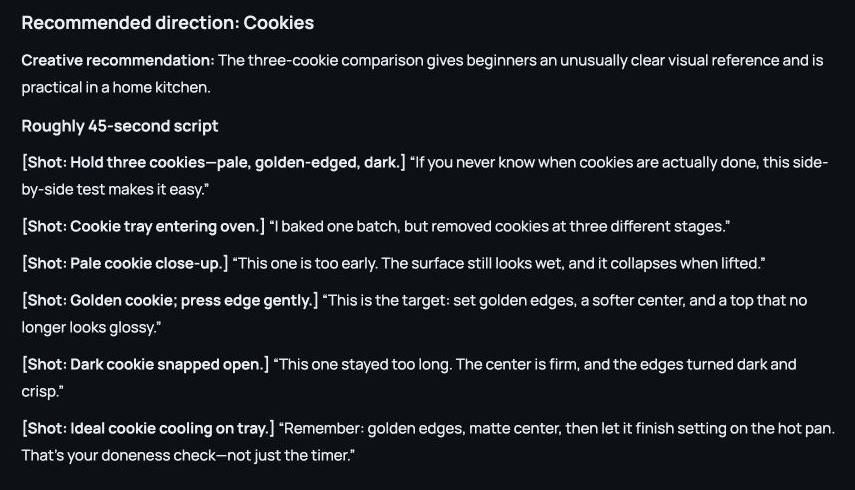
Kabo’s AI Agent supports public account and video analysis, then lets you question the findings, develop directions and write in one conversation. Use it before filming when a brief needs research, or after publishing to plan the next video.
The saved conversation below moves from baking references into an original script with shot notes. You can also develop a video idea through a focused tool before expanding the brief.
Free path and pricing: Sign in for Free daily Agent credits; analysis and revisions use available allowances. Public research does not expose a competitor’s private analytics. Pro is US$7.99/month.
Build a small creator toolkit
Making a new video? Pair a writing tool with Canva and your editor. Add ElevenLabs only if you need synthetic narration; keep the script in Kabo if you already developed it there.
Repurposing a recording? Try Descript’s clipping before adding OpusClip. A dedicated tool makes more sense when you regularly need several short versions. After publishing, use YouTube analytics to decide what to improve.
Before paying for an AI plan
Choose a plan by the file you need to publish: resolution, watermark, editing access and export window. Budget for source footage and revisions, since media minutes and AI credits are separate allowances. For client or monetized work, check the license on generated audio and stock assets before production.
Prices and conditions checked October 22, 2026, in US dollars. The Kabo example uses a saved conversation; other product details use official sources.