
A free toolkit from idea to upload
This toolkit follows a video from idea to upload. Free means an ongoing free edition, with the account, format and asset limits shown below.
| Stage | Tool | Free path | Main limit |
|---|---|---|---|
| Find a direction | Google Trends | Free Explore | Relative interest, not search volume |
| Develop the brief | Kabo Free | Account with daily Agent credits | Research and revisions use allowances |
| Record | OBS Studio | Free desktop software | Setup and capture permissions |
| Edit | DaVinci Resolve Free | Ongoing Free edition | Format, hardware and Studio-only features |
| Package | Canva Free | Free account and included assets | Pro assets and some export options |
| Publish and learn | YouTube Studio | Your own channel; Audio Library | Data availability and track-specific licenses |
Published by Kabo. Tools are arranged by workflow, without an overall performance ranking.
Research: find an angle and turn it into a brief
Google Trends: compare interest, not search volume
Use Google Trends when you have several related topics and want context before choosing one. Compare search terms with the same region, period and search type. Select YouTube Search when that is the behavior you want to examine, and keep Search terms distinct from Topics.
Look for seasonality or a sustained change worth investigating. The normalized 0–100 index measures relative interest in the selected comparison, not monthly searches or keyword difficulty. Low or missing data does not establish that nobody wants the video.
Free path: Explore is free. Use its signals to frame a question, then inspect relevant videos before committing to a topic.
Kabo Free: develop references into an original plan
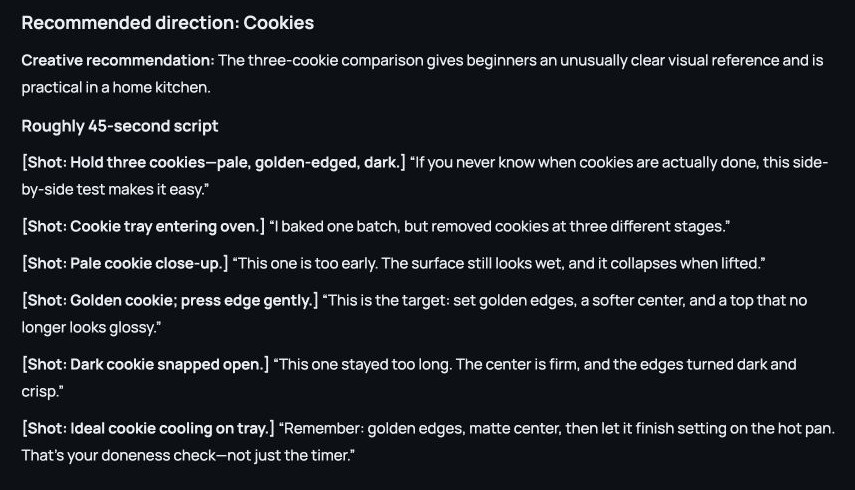
Use Kabo to turn public references into a direction of your own. Its AI Agent supports account and video analysis, followed by questions, ideas and writing in the same conversation. Ask what makes the references useful, which angle fits your audience, and how to demonstrate it in a script.
Free path: Sign in to the $0 Free plan for daily Agent credits. Analysis and follow-up requests depend on available allowances. Public research does not require connecting a competitor’s account or reveal their private analytics.
Make the video with free recording, editing and design tools
OBS Studio: record your screen and sources
OBS Studio fits software tutorials and demonstrations that combine a screen, camera or microphone. The free, open-source recorder works on Windows, macOS and Linux. Arrange your sources into a scene, then make a short sample to check the picture and sound. For phone-only filming, skip OBS and take the footage straight to your editor.
Free path: Install the desktop app and allow the capture permissions your recording needs. Local recording does not require connecting a YouTube channel; streaming is a separate setup.
DaVinci Resolve Free: finish the edit
DaVinci Resolve Free combines editing, color and audio post-production. Choose it for control over the full video: select takes, trim pauses, balance speech and add supporting visuals.
The Free/Studio comparison describes support for virtually all 8-bit formats up to 60 fps at UHD 3840 × 2160. Check your camera format and operating system, then try a short project on your computer. Neural Engine features, text-based editing and advanced noise reduction belong to paid Studio.
Free path: Download the Free edition. Allow for learning time, storage and a computer capable of handling your footage.
Canva Free: package the video with a readable thumbnail
Canva Free combines a still image, a few words and a clear focal point into a thumbnail. Start with your own photo or assets marked Free, then preview your thumbnail at viewing size. A YouTube title draft can help you make the title and image complement each other. Basic design does not require AI credits.
Free path: Canva Free costs $0. Use included content for an ordinary PNG download; Pro elements can introduce watermarks or payment requirements. Transparent backgrounds and some other export options are restricted. Review the content license for commercial designs; permission to use stock in a design is not permission to resell the stock itself.
Publish and learn with YouTube Studio
Use YouTube Studio to manage uploads and review your own channel’s reach, engagement and audience reports. Check the title, thumbnail and video description together before publishing. For deeper analysis, compare free YouTube analytics tools; some reports need more channel data.
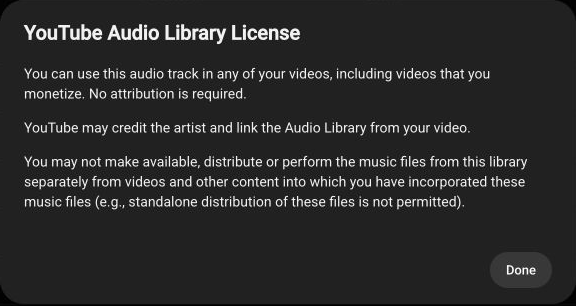
The Audio Library provides music and sound effects with track-specific licenses. “Chains,” shown below, allows monetized video use without attribution but prohibits standalone distribution of the music file. Other tracks may require attribution.
Free path: Use the Google account with access to your channel. Studio analytics covers your own channel, while music use follows the selected track’s conditions.
Where free plans stop being enough
Pay when a recurring limit blocks the work: credits, a required codec, premium assets or an export option. First check whether a simpler workflow covers the job. Keep source footage, project files and music-license notes; free software still needs storage, setup time and suitable equipment.
Free paths and conditions checked October 22, 2026. Product details use official sources; the Kabo example uses a saved conversation, and the Audio Library image shows a checked track license.