
Kabo vs Tokchart at a glance
Start with the work you want to finish: finding a sound, understanding an account or planning a video.
| Your task | Kabo | Tokchart |
|---|---|---|
| Find a sound | Research a brief Ask for candidates and explain their fit. | Browse trends Explore sound charts and dedicated music tools. |
| Understand an account | Ask and follow up Investigate topics, videos and transferable patterns. | Review and track Use Genius Reports and tracked account updates. |
| Develop the next video | Revise in conversation Move from references to ideas, shots and writing. | Discover and organize Keep sound favorites and use account insights. |
| Repeat the workflow | Task-based access Daily credits; Pro expands research access. | Plan-based tracking Account limits, refresh rates and campaign features. |
Why compare Kabo and Tokchart?
Finding a popular sound is only part of making a video. You still need an opening, a reason for your audience to watch and a sequence you can actually record. A creator working alone may need help with those decisions more than another chart.
An account manager has a different problem: revisiting profiles, keeping updates consistent and presenting findings to clients. Tokchart’s sound tools and account reports serve that recurring work. Compare the tools against the part of your process that takes the most effort.
Finding sounds: browse the chart or research a brief
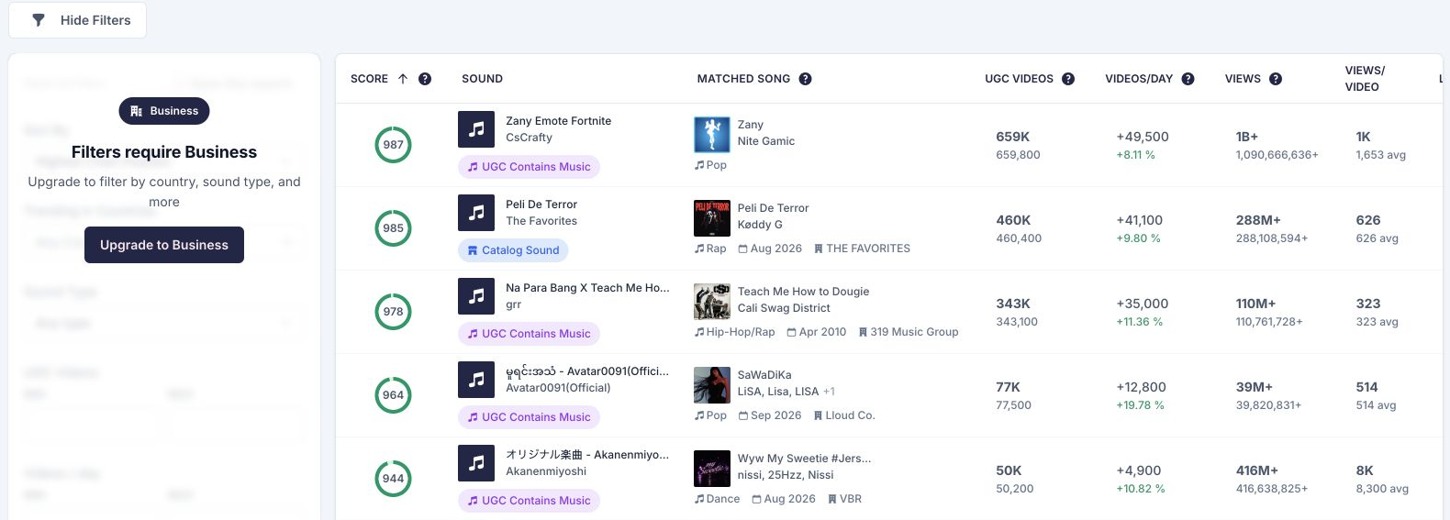
Tokchart’s chart is the direct starting point when you want to scan named sounds and inspect their uptake. The public view provides a preview; the country and other filters shown in the captured interface require Business. Use the list to find candidates, then inspect the exact sound version before building around it.
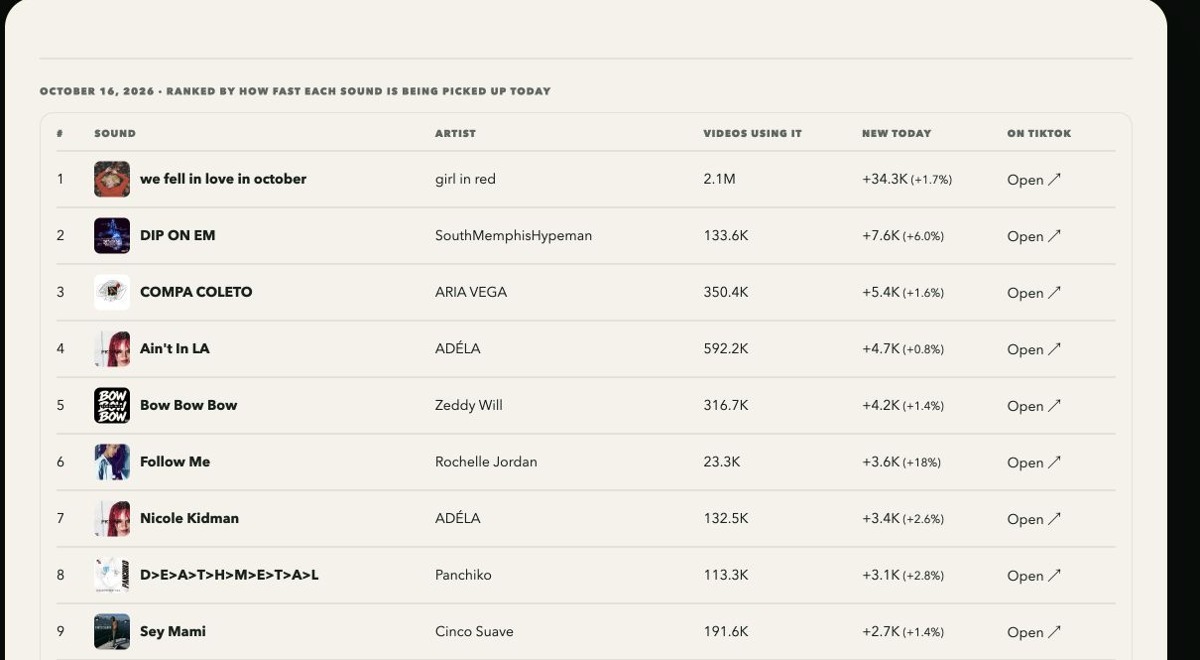
Kabo can start with a brief instead: beginner baking, a solo creator and a short bake-along. Its sound research workflow can produce candidates for a follow-up discussion. Ask which option fits your concept and why, then narrow the direction around your audience and filming constraints.
The example below returned 20 candidates instead of the requested five, using global daily uptake rather than the requested US seven-day scope. It provides starting references, but it cannot support a claim about which sound is currently rising fastest in the US.
Account analysis: reports, tracking and follow-up questions
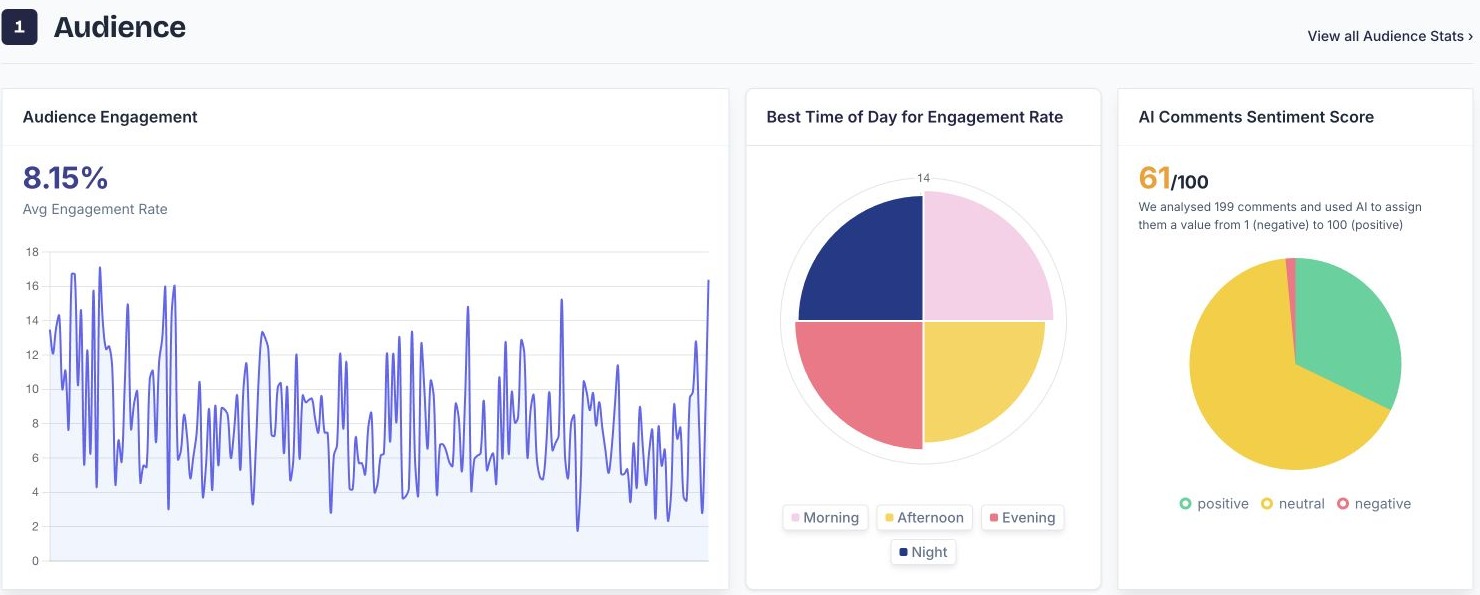
Tokchart offers tracked profiles and Genius Reports. Its public example includes audience engagement, posting-time insights and AI comment sentiment. This suits account managers who want a structured report to revisit or discuss with a client. It also means account analysis is part of the comparison, alongside music discovery.
Kabo’s account analysis lets you pursue a particular question across an account and its videos. Ask which topics recur, which audience problems they address and which references deserve a closer look. Then ask how a useful pattern could work for a smaller channel or a different subject. The output can include a research summary, selected references and proposed directions; the conversation lets you challenge the reasoning before choosing one.
From a sound candidate to an original filming plan
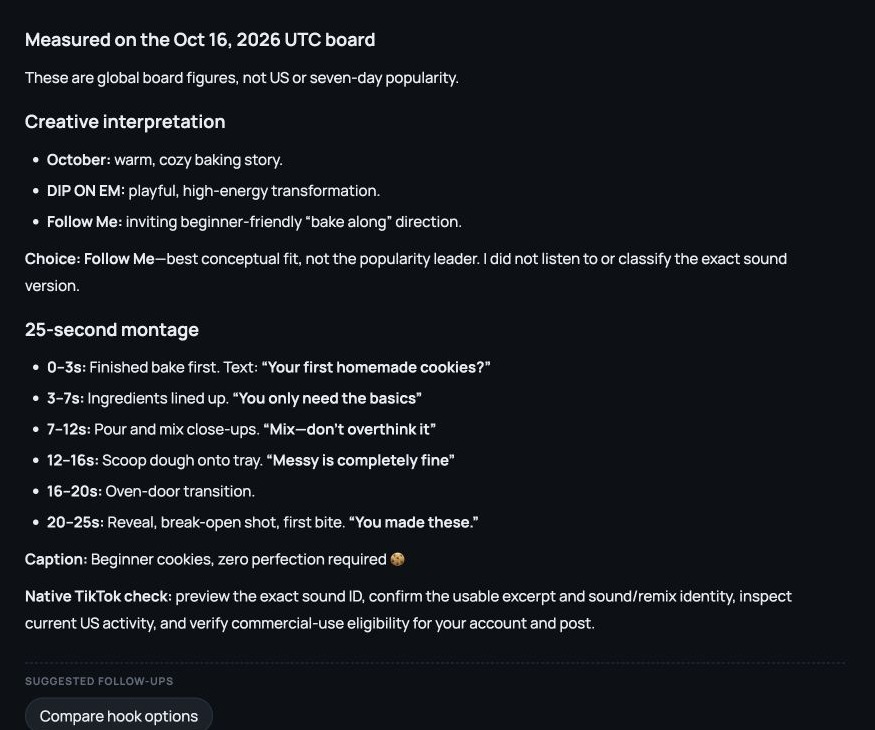
For the beginner baking brief, Kabo proposed using “Follow Me” for an inviting cookie bake-along. It was chosen for conceptual fit, rather than its position on the chart. The audio itself was not auditioned, so that recommendation still needs an in-app listening check.
The resulting 25-second plan starts with finished cookies, moves through ingredients, mixing and imperfect dough scoops, then ends with an oven transition and broken-cookie reveal. On-screen lines such as “Messy is completely fine” make the beginner audience specific. A caption completes the draft.
The practical benefit is that content planning and writing follow directly from the research. If you can film only three setups, ask for a simpler sequence. If the opening feels generic, revise the hook while keeping the audience and recipe in context. You leave with shots to record, not only a recommendation to use a trending sound. Check the exact excerpt, timing and commercial permissions in TikTok before filming.
Free access, paid plans and what you actually need
Kabo offers daily free credits; Pro is $7.99/month. Research and premium tasks consume allowances, so it is not unlimited analysis.
Tokchart’s monthly plans distinguish substantially different jobs. Pro is $14.99 with one tracked account, weekly updates and discounted Genius Reports. Business is $59 with 20 tracked accounts, daily updates, free Genius Reports and campaign features. Discovery is $149 and adds Radar. Public chart access does not make every filter free.
Try one complete creative brief within Kabo’s credits. For filtered discovery or recurring reports, check the relevant Tokchart tier.
Which should you choose for your next video?
If you open TikTok knowing you want a sound but need a shortlist, start with Tokchart. If you already have an idea but cannot decide how to make it work for your audience, start with Kabo. For client reporting, check Tokchart’s account update limits; for creative development, try taking one Kabo brief all the way to a usable draft.
Kabo vs Tokchart FAQ
Is a trending sound safe for commercial use?
Popularity does not establish permission. Check the exact version and applicable commercial usage rights in TikTok.
Must I bring a Tokchart list to Kabo?
No. Begin with an account, video or research question. A shortlist is one possible input.
Sources and scope
Published by Kabo. Sound screenshots and the filming draft are from October 16. The Tokchart report is an official public example viewed October 22, not our account measurement. Sound licensing and publishing performance were not tested.
USD prices checked October 22, 2026. Plans and allowances can change.