
Social Blade vs Viewstats at a glance
A channel overview and a shortlist of videos answer different research questions.
| Your task | Social Blade | Viewstats |
|---|---|---|
| Check channel growth | Statistics and rankings Public totals, growth history and projections. | YouTube context Channel trends, videos and similar channels. |
| Look across platforms | Five platforms YouTube, TikTok, Twitch, Facebook and Instagram. | YouTube focus A dedicated channel and video research environment. |
| Inspect a video | Video Statistics Public counts, a chart and daily rows. | Performance context Views over time and typical-performance comparisons. |
| Find creative references | Background research Use statistics to shortlist channels worth inspecting. | Discovery workspace Outliers, Thumbnail Search and Collections; check plan access. |
Why compare Social Blade and Viewstats?
Channel growth and an individual upload’s performance are different questions. One standout video does not necessarily mean the whole channel is accelerating.
For a scale check, channel statistics may be enough. For your next video, inspect the topic, packaging and performance of particular uploads. Compare the context each tool provides around those numbers.
Channel stats, growth history and platform coverage
Social Blade covers YouTube, TikTok, Twitch, Facebook and Instagram. Its channel pages bring together public totals, rankings, growth charts and projections. That breadth helps when you need to look up the same creator across platforms without changing the type of tool you use.
Viewstats focuses on YouTube, with channel trends, video lists, projections and similar-channel context. It is a more relevant starting environment when the next step is studying specific uploads rather than collecting a broad creator profile.
A rank summarizes a metric; a projection extrapolates growth. Neither determines which topic to make next. For a channel comparison, keep the metric and time window consistent, then open the underlying videos before drawing a content conclusion.

Video research: check dates before comparing results
Both tools have video lists. The useful check is whether the returned uploads match the period you want to study.
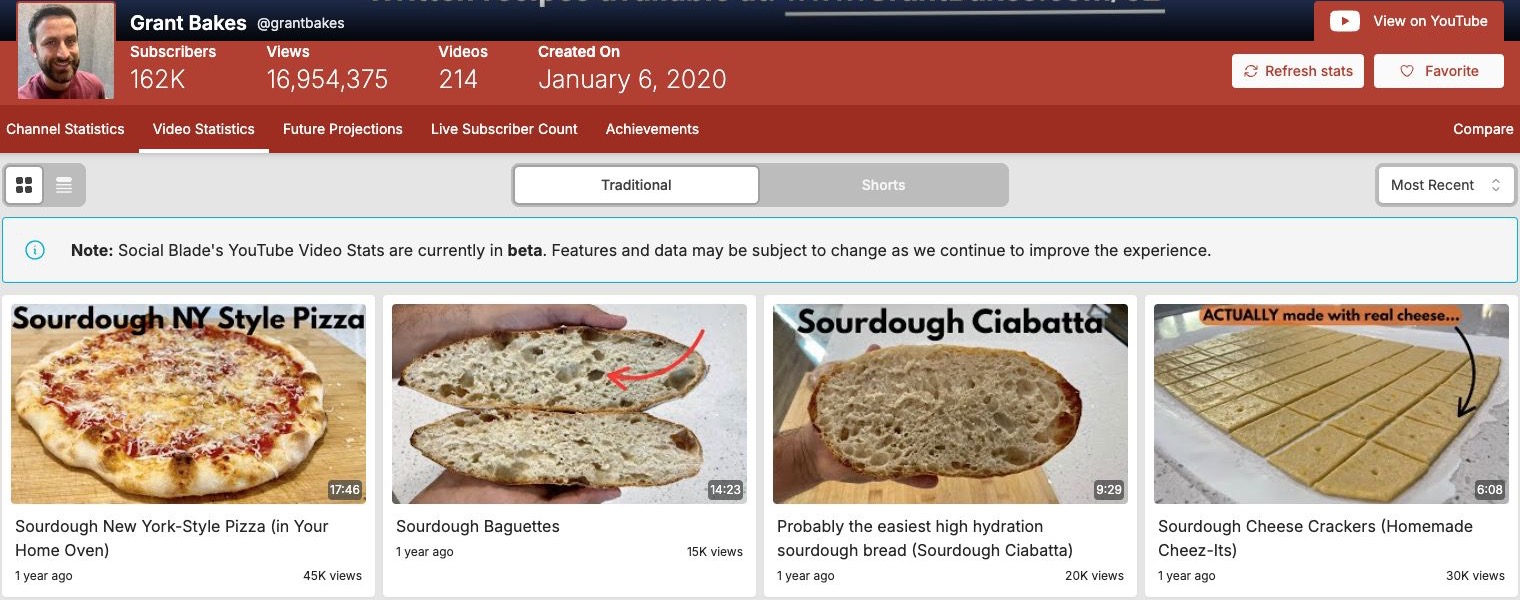
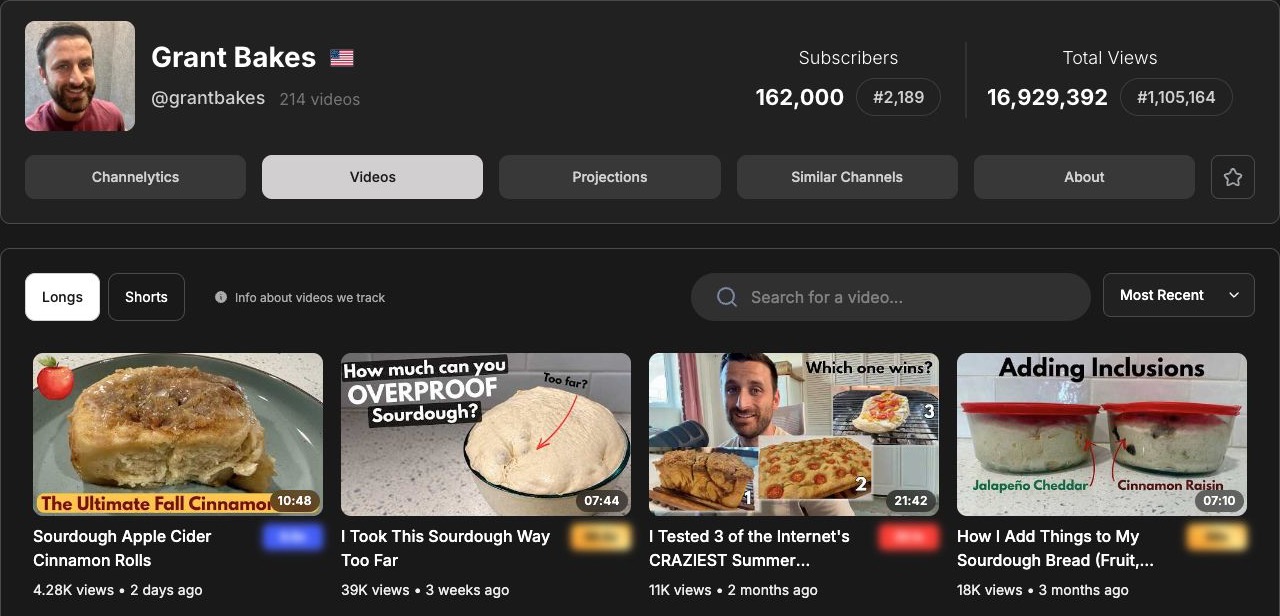
The saved Grant Bakes lists below both use a recent-first setting, yet begin with different uploads. Social Blade starts with an older pizza video; Viewstats starts with a recently published cinnamon-roll video. For a question about this month’s topics, that difference changes the references you would select.
Check the first few publication dates against YouTube, and separate long-form videos from Shorts. These historical screens do not establish that either database always has better coverage. They show why a recent-first label alone is insufficient when building a research sample.
The same video, two ways to inspect performance
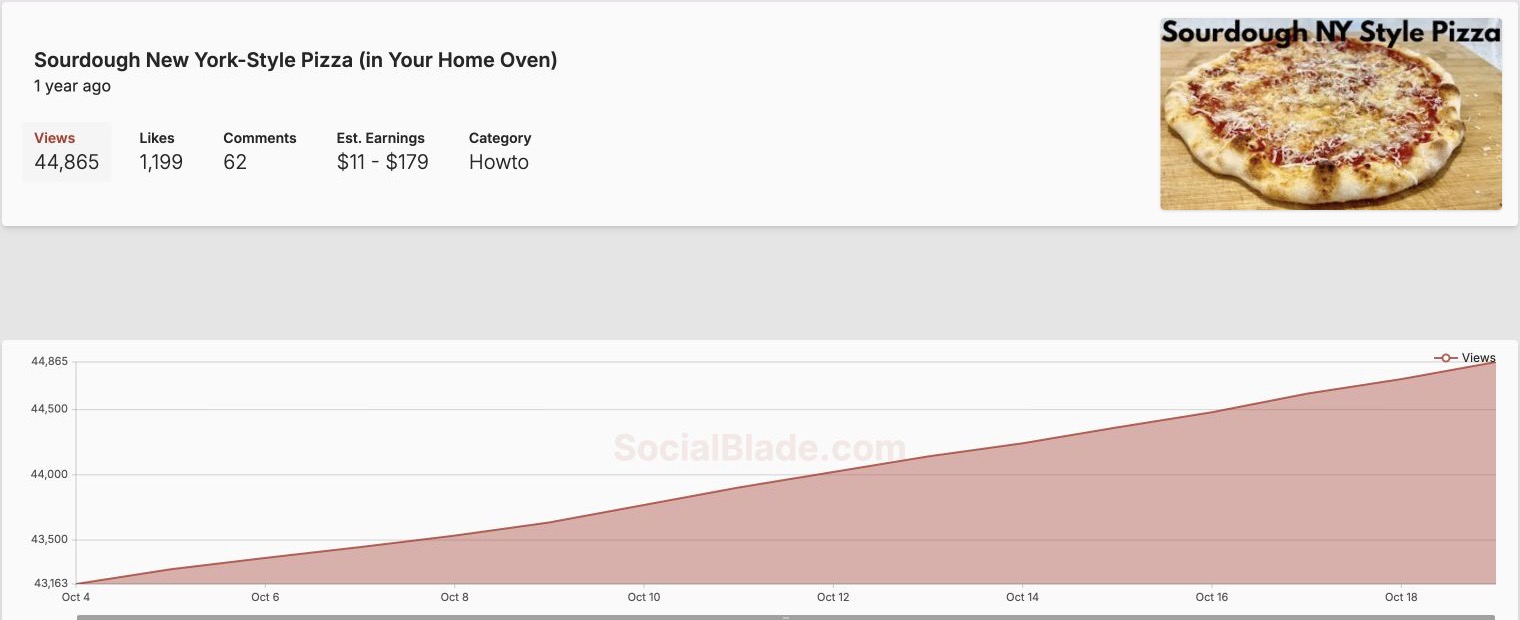
For “Sourdough New York-Style Pizza,” Social Blade displayed 44,865 views, 1,199 likes and 62 comments. Viewstats displayed 44K views, 1.20K likes and 62 comments. Rounding and snapshot timing matter; those figures do not establish an accuracy winner.
Social Blade’s video detail also included a views chart and daily rows. Viewstats adds a useful comparison question: how does an upload’s trajectory look against typical performance at a similar time after publication?
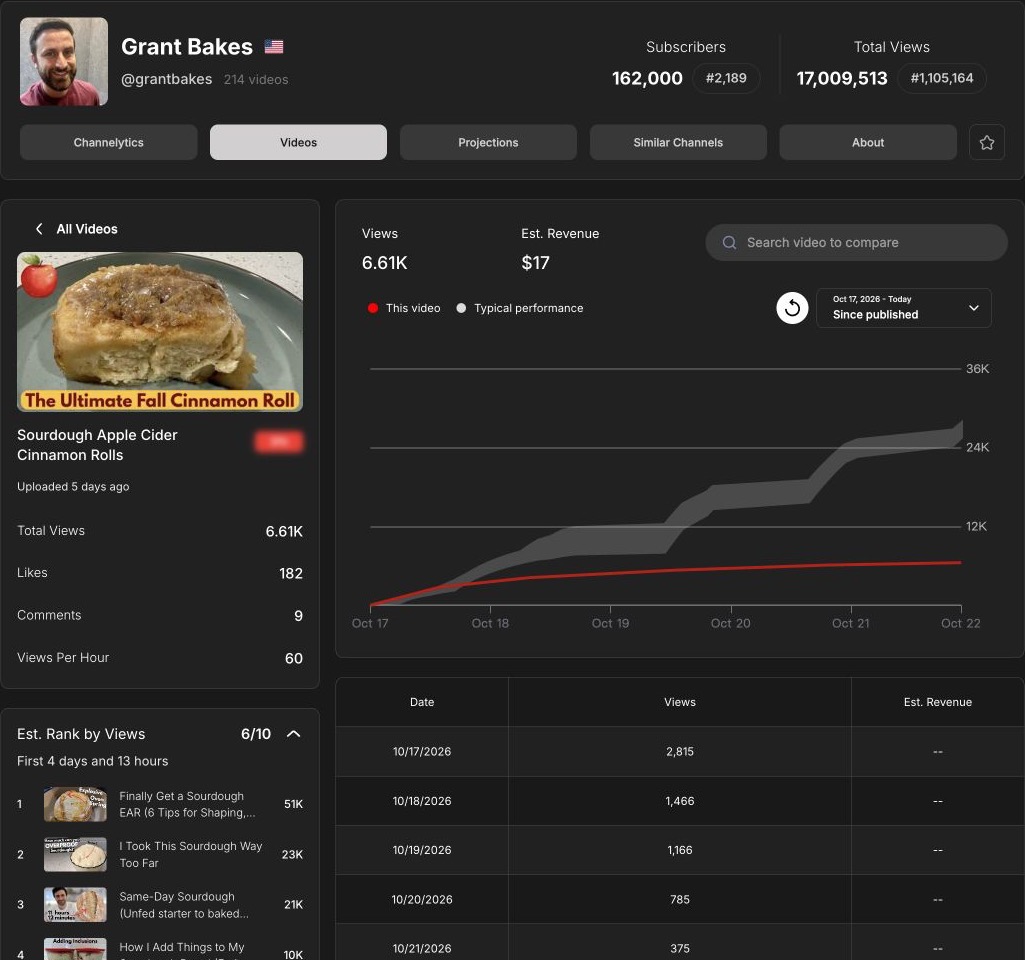
The separate cinnamon-roll example shows a since-published curve alongside a typical-performance band and an estimated rank for the same elapsed time. This is more informative than comparing a five-day-old upload’s total with a year-old video. It still does not reveal private retention or explain what caused the result.
Outliers, thumbnails and a shortlist for your next video
Viewstats’ Outliers helps search for videos performing unusually well relative to their channels. Thumbnail Search supports packaging research, while Collections organizes references. That combination suits a creator who regularly builds an inspiration shortlist.
Social Blade can help identify channels to investigate, but its statistics workflow serves a different purpose from that discovery workspace. Viewstats’ Outliers and Thumbnail Search required an upgrade in the recorded free session. A locked result is an access limit, not evidence that the product has no useful references.
Free access and the plan worth paying for
Start with free access if you only need occasional lookups. Social Blade requires login for some features; paid memberships expand history, favorites, reports and lists. Bronze was $5.99/month or $59.99/year at the recorded check. Verify the allowance for the specific view you need.
Viewstats Pro is $49.99/month. Consider it for repeated discovery and packaging research, rather than assuming a basic channel lookup requires Pro. An earnings estimate in either product is not the creator’s actual income.
Kabo: turn channel findings into a filming brief
A growth chart or an outlier shortlist can leave you with a writing task. Kabo’s AI Agent can analyze a channel or video, answer follow-up questions and develop ideas into a script. For 20 supplied Grant Bakes video links, it identified beginner problem-solving and time constraints as useful topic frames, then proposed three ideas, including a first-loaf guide organized around readiness at each stage. That example used public metadata, without inspected footage. Use it to interpret references and develop a brief alongside your statistics research.
Which should you choose?
Use Social Blade when the deliverable is a creator’s scale, growth history or cross-platform profile. Use Viewstats when it is a set of YouTube references with video-level performance context. Before subscribing, complete one representative task and check whether the resulting information changes your next decision.
Social Blade vs Viewstats FAQ
Why do their numbers or projections differ?
Different update times, rounding, available history and models can produce differences. Compare the same metric, date and video before interpreting them.
Can either show a competitor’s real revenue?
Public earnings figures are estimates. Use authorized first-party analytics for actual revenue and private audience metrics.
Can I use only the free versions?
Yes, if they cover your lookups. Upgrade for the particular history, reporting or discovery feature you repeatedly need.
Sources and scope
Published by Kabo. Screenshots reuse October 15–22 research. The paired lists and pizza details are from October 19; the cinnamon-roll comparison is from October 22. Counts are snapshots, estimates are not actual income, and paid discovery results were not tested.
USD pricing checked October 19–22, 2026. Prices, access and allowances can change.