
Kling Image 4.0 Carousel Test: What to Check Before Delivery
Kling Image 4.0 can turn a workshop outline into a five-slide Instagram carousel. Before you post it, swipe through the downloaded slides on your phone. Check that each slide adds something, the small print is readable, and the offer and booking slides show the same price. In our $49 workshop example, the copy held up. It took a closer look to spot the repeated frames and stray marks on the artwork, and a separate price edit showed how easily the booking slide can fall out of date.
Before you spend your free credits
Say you’re selling a $49 workshop on filming better Reels with your phone. Show viewers the shot they’ll learn to make, then give them a glimpse of how it’s done. The offer and booking details can wait until the last two slides.
Five slides cost us 20 bonus credits on a free Kling web account. Check the quote in your account and leave room if you expect to revise a slide.
- Open the image generator and select Kling Image 4.0, then Series Mode.
- Choose 2K, the 3:4 portrait preset, and five outputs. Selecting Series Mode can reset the other settings, so check them again before you generate.
- Give each slide one job and specify the exact copy. Save the original PNGs to compare against any revised files.
If the quote is higher than your free balance, stop before you submit. See the Kling Image 4.0 User Guide for the generation modes.
Jump to the delivery worksheet if you already have a set to review.
A five-slide workshop carousel with a story
Here’s the carousel for Frame Lab, our fictional workshop. Swipe from the finished shot to the desk where it started. You’ll see the same striped mug and coral phone as the creator moves from a washed-out window shot to three angles she can use in a Reel.
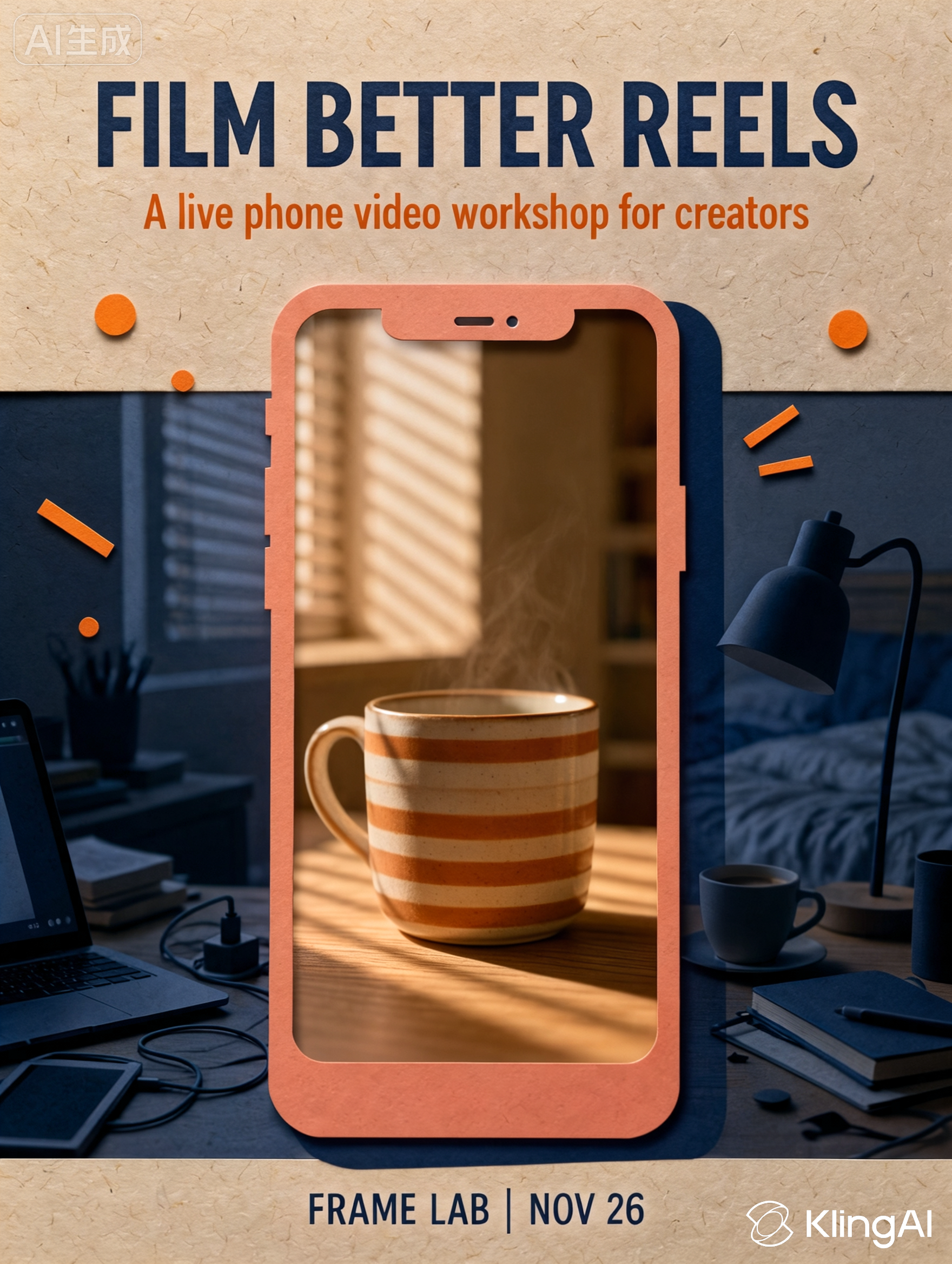
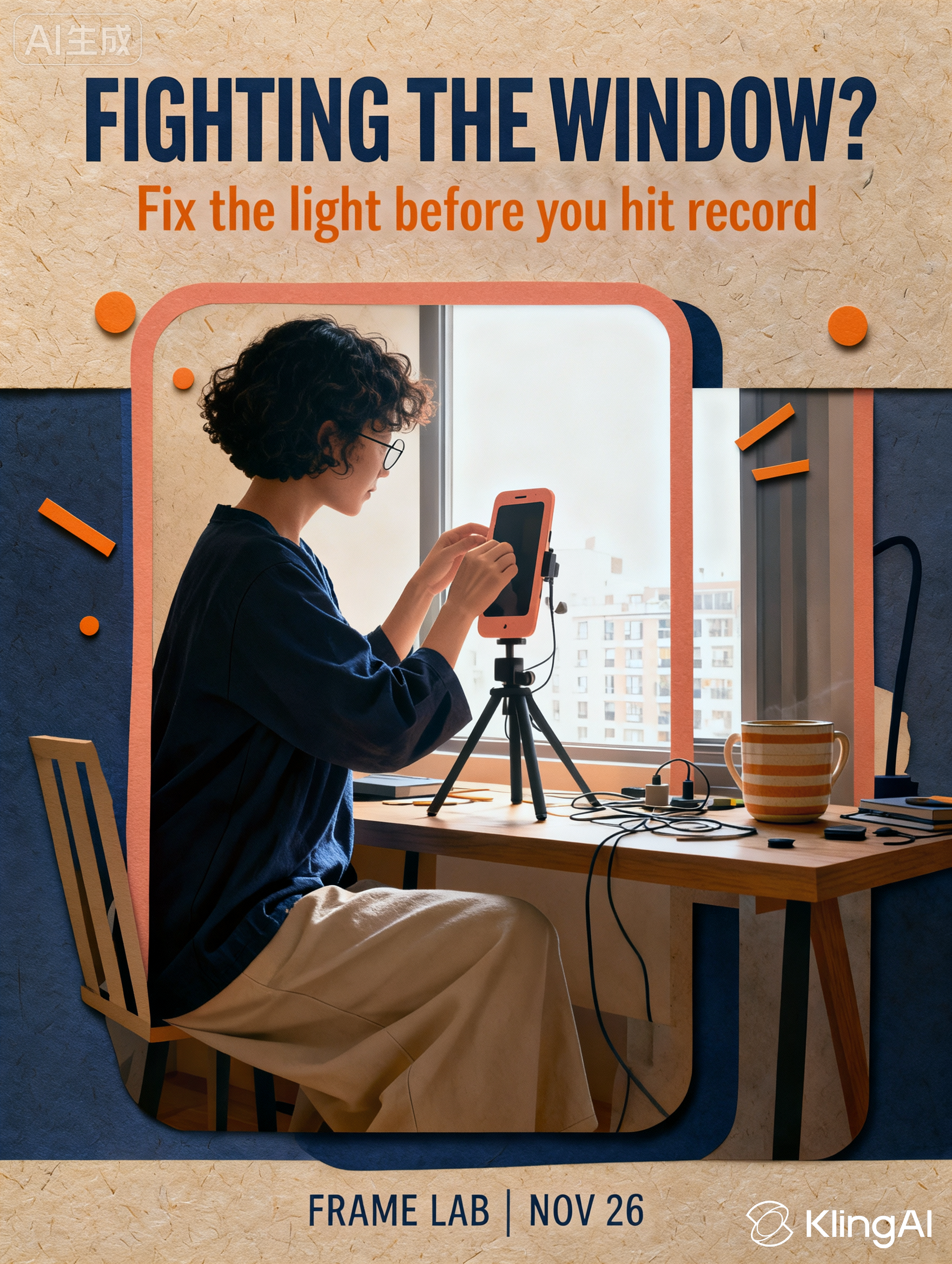
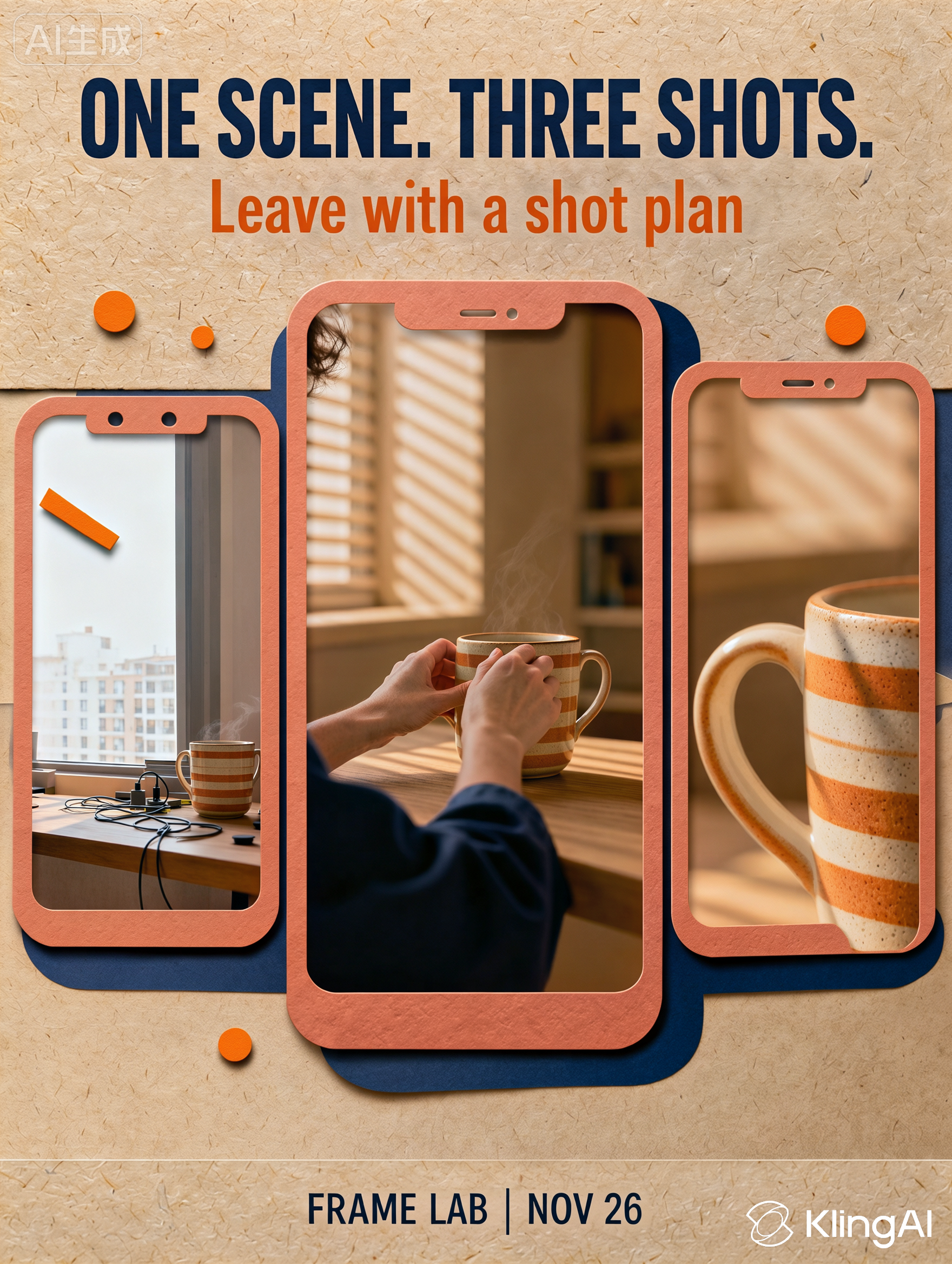
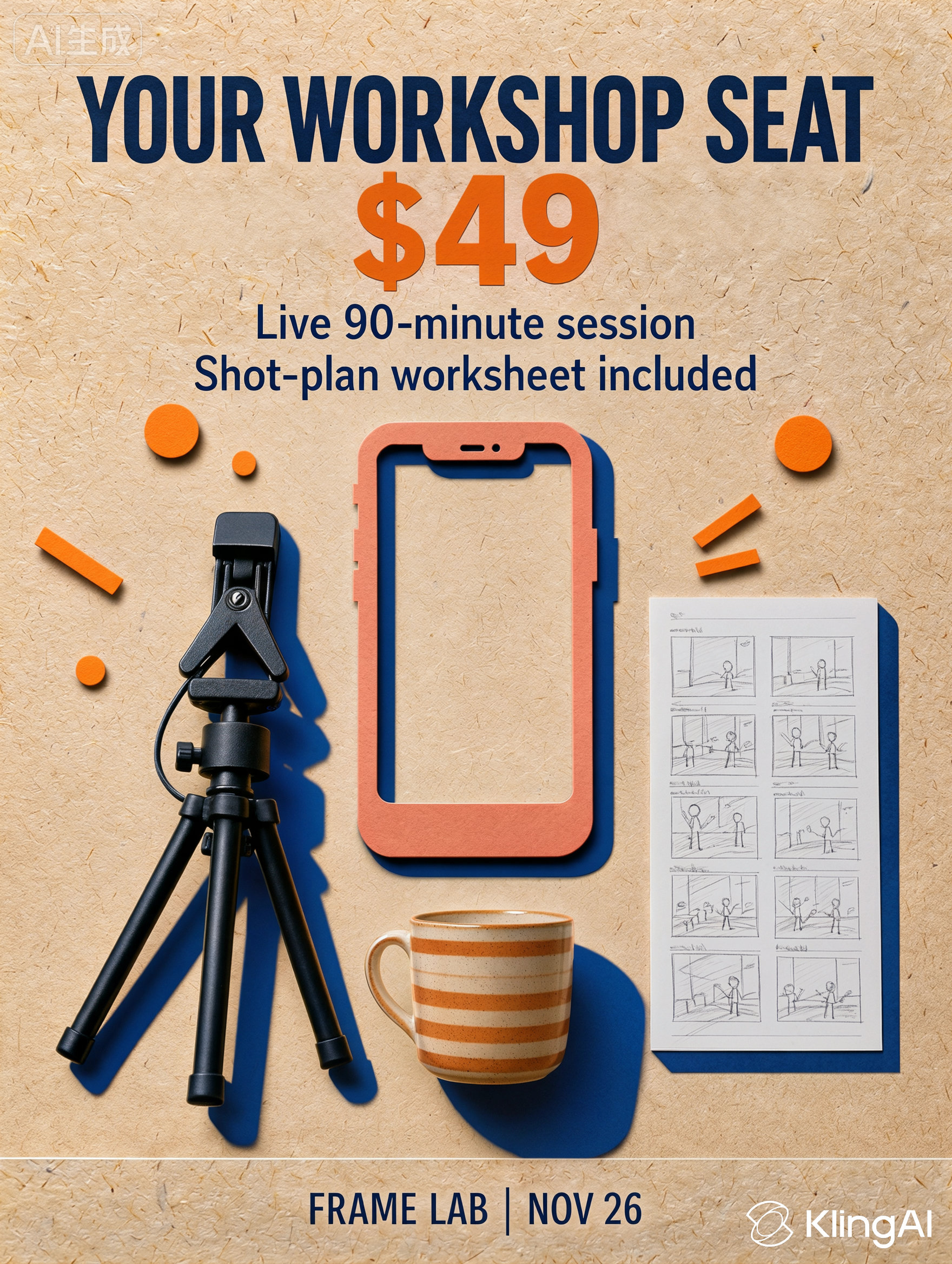
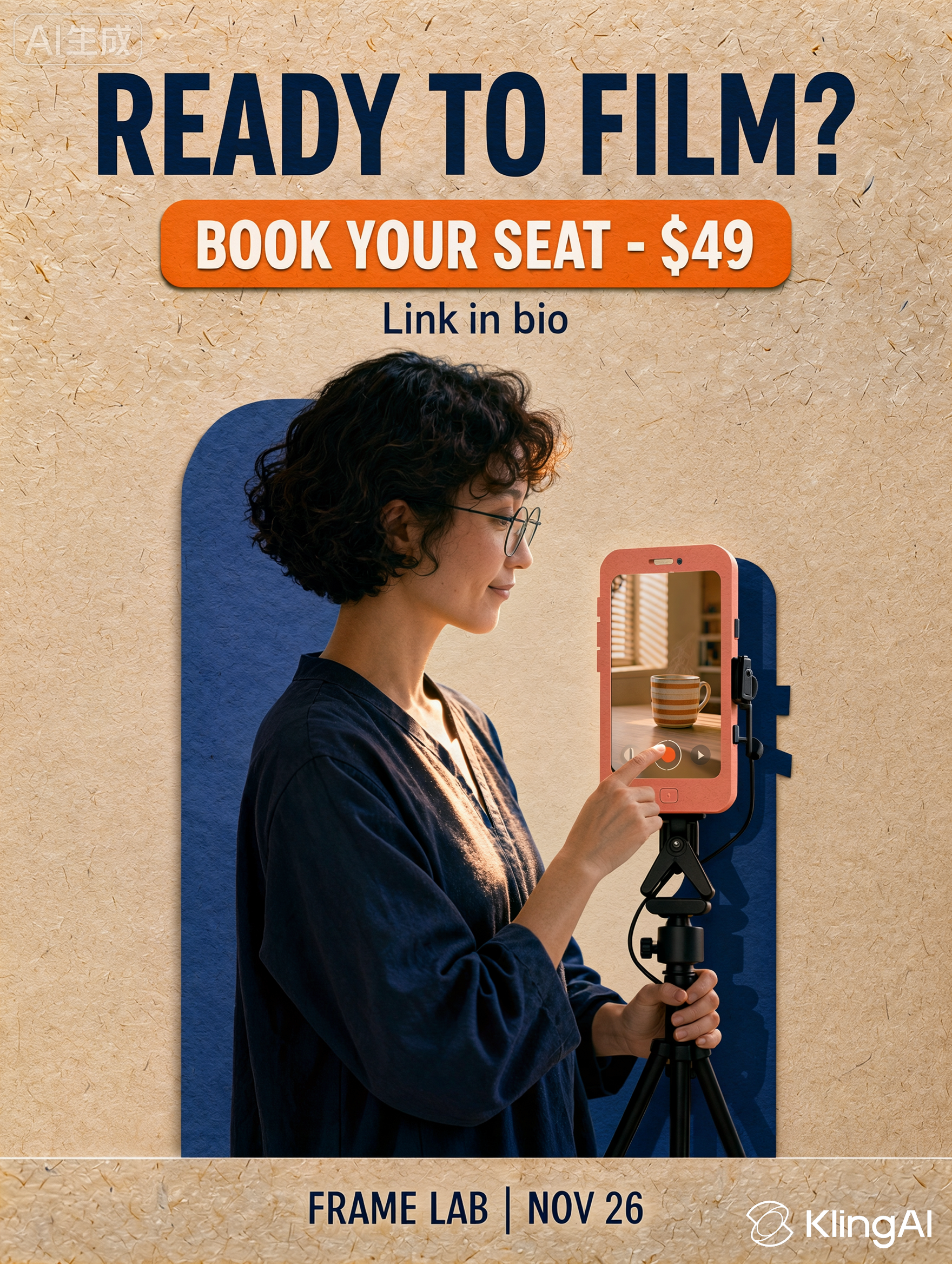
Tap a slide for the full-size PNG. The footer on all five reads FRAME LAB | NOV 26. November 26 is the fictional workshop date.
| Slide | What the copy needs to say | Visual check |
|---|---|---|
| 1. Cover | A live phone video workshop for creators. | The screen reads as the finished shot. |
| 2. Problem | The problem is window light. | The creator, phone and mug are easy to recognize. |
| 3. Lesson | You’ll leave with a shot plan. | You can tell the three shots apart. The thick phone frames compete with them. |
| 4. Offer | $49 for a live 90-minute session with a shot-plan worksheet. | The price stands out. Look for stray marks on the storyboard. |
| 5. Booking | Book for $49 via the link in bio. | The phone shows the mug as the creator goes to record. |
Scroll horizontally to read all columns.
You can adapt the prompt below for your own offer. Give Kling the exact words for each slide, plus a few details that should carry through the whole set, like the same prop or footer.
Generate 5 separate 3:4 Instagram slides in Series Mode for the fictional Frame Lab phone video workshop. Make a real campaign with a visual story: one creator turns an ordinary bedroom desk into a tiny filming studio. Contemporary editorial cut-paper collage with realistic photographic cutouts, warm window light, tactile cream paper, ultramarine shadows and a hit of vivid tangerine. Across the set, show the same young adult woman with short dark curly hair, round glasses and a cobalt overshirt, the same coral phone and clamp tripod, striped mug and apartment window. Shoot a different angle on each slide. Let the image do the storytelling. Use bold navy type and orange highlights on a clean cream text area, legible at phone size, with a small "FRAME LAB | NOV 26" footer in the same position each time. Only render the quoted copy for the corresponding slide. No invented text, numbers, QR codes, or logos. Price appears on slides 4 and 5 only.

1. Cover. A coral smartphone viewfinder dominates the composition. Outside it is a messy, dim desk; inside it the exact same desk becomes a beautiful close-up with a shaft of light. Text: "FILM BETTER REELS" and "A live phone video workshop for creators".
2. Audience. Wide shot of the same creator trying to film a striped mug against a blown-out window, with crooked framing and messy props. Make it playful and recognizable. Text: "FIGHTING THE WINDOW?" and "Fix the light before you hit record".
3. Outcomes. Three inset film-strip frames show the same mug and hands in three readable shot sizes: wide setup, medium action, tight detail. The surrounding collage still reads as a single slide. Text: "ONE SCENE. THREE SHOTS." and "Leave with a shot plan".
4. Offer. Overhead view of the same desk, arranged as a workshop kit: phone, clamp tripod, striped mug and a paper storyboard with sketches only. Keep the price large and isolated for a later edit. Text: "YOUR WORKSHOP SEAT", "$49", "Live 90-minute session", and "Shot-plan worksheet included".
5. Booking. The same creator presses record by the window and the finished mug shot glows on the phone. Conclude the visual story. Text: "READY TO FILM?", "BOOK YOUR SEAT - $49", and "Link in bio".
Read the copy and check the visual rhythm
Read the words a buyer will rely on. On the offer slide, $49 is easy to spot, but the lines below it tell you what you’re paying for: a live 90-minute session and a shot-plan worksheet. Those lines came through, and the booking slide repeats $49. Check the small print against your own offer while it’s still easy to fix.
The cover promises a shot you could make at home. By slide three you can see how: start wide, show the hand in motion, then cut in close. The mug and coral phone help you follow the setup as the angle changes.
The orange phone frame makes sense on the cover: it shows what the camera sees. By slide three, the repeated frames and hard shadows start to make the set feel like a template. I’d keep the frame on the cover and let the window light, the creator’s hands and the close-up fill the later slides. The same type and footer can make them feel like one set.
Look at the paper on slide four. The tiny marks look like writing, and a buyer could take it for a preview of the promised worksheet. If you’re showing what they’ll get, use a readable image of the actual worksheet. The Canva Craft text-editing guide shows ways to take control of text and layout when a generated slide needs more work.
A price edit can leave the booking slide out of date
Say your workshop price goes from $49 to $59. For the earlier Frame Lab layout below, we opened the offer slide in Edit Text, selected $49 and asked Kling for $59 as a single 2K image. The edit cost 3 bonus credits.
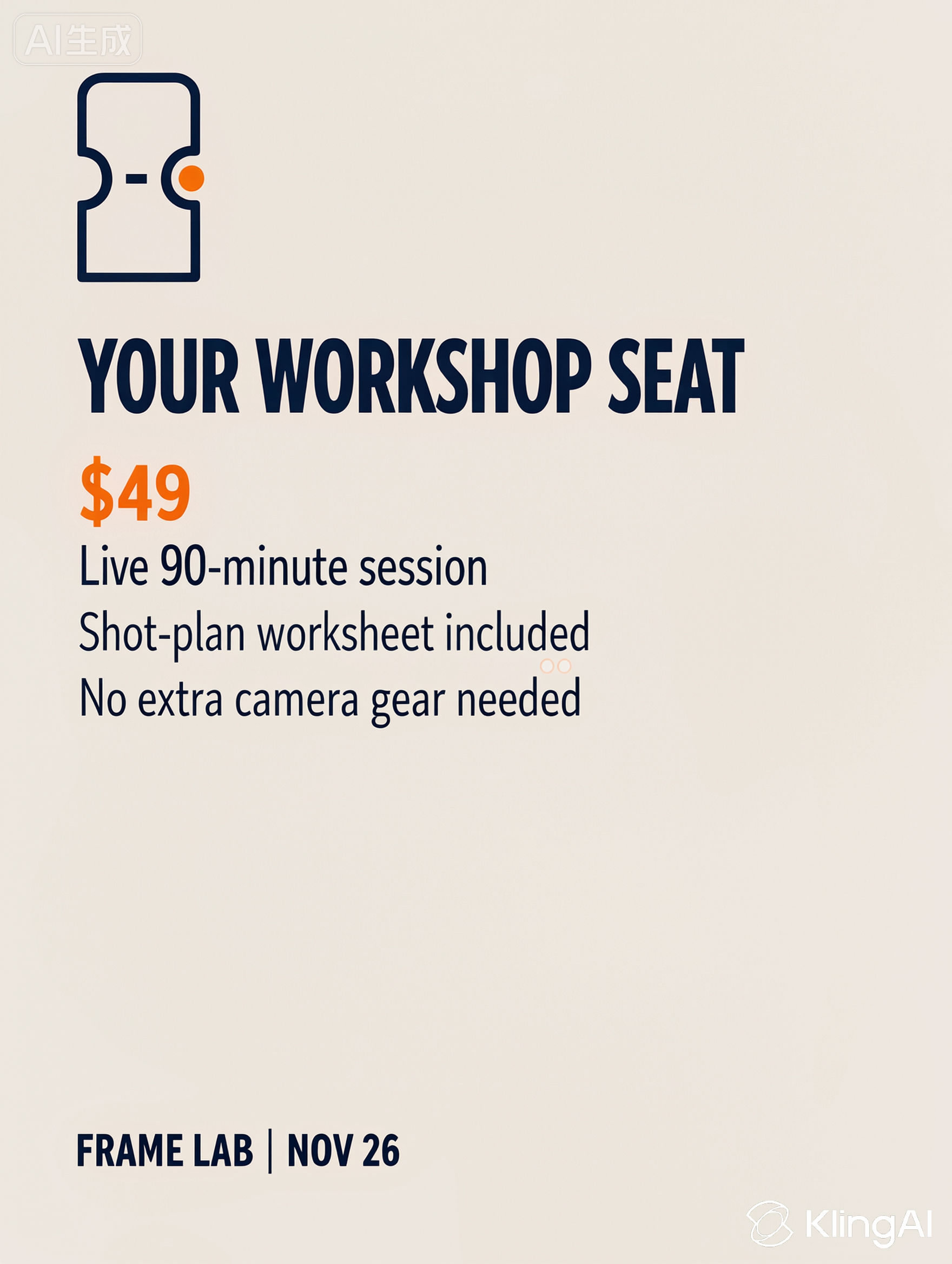
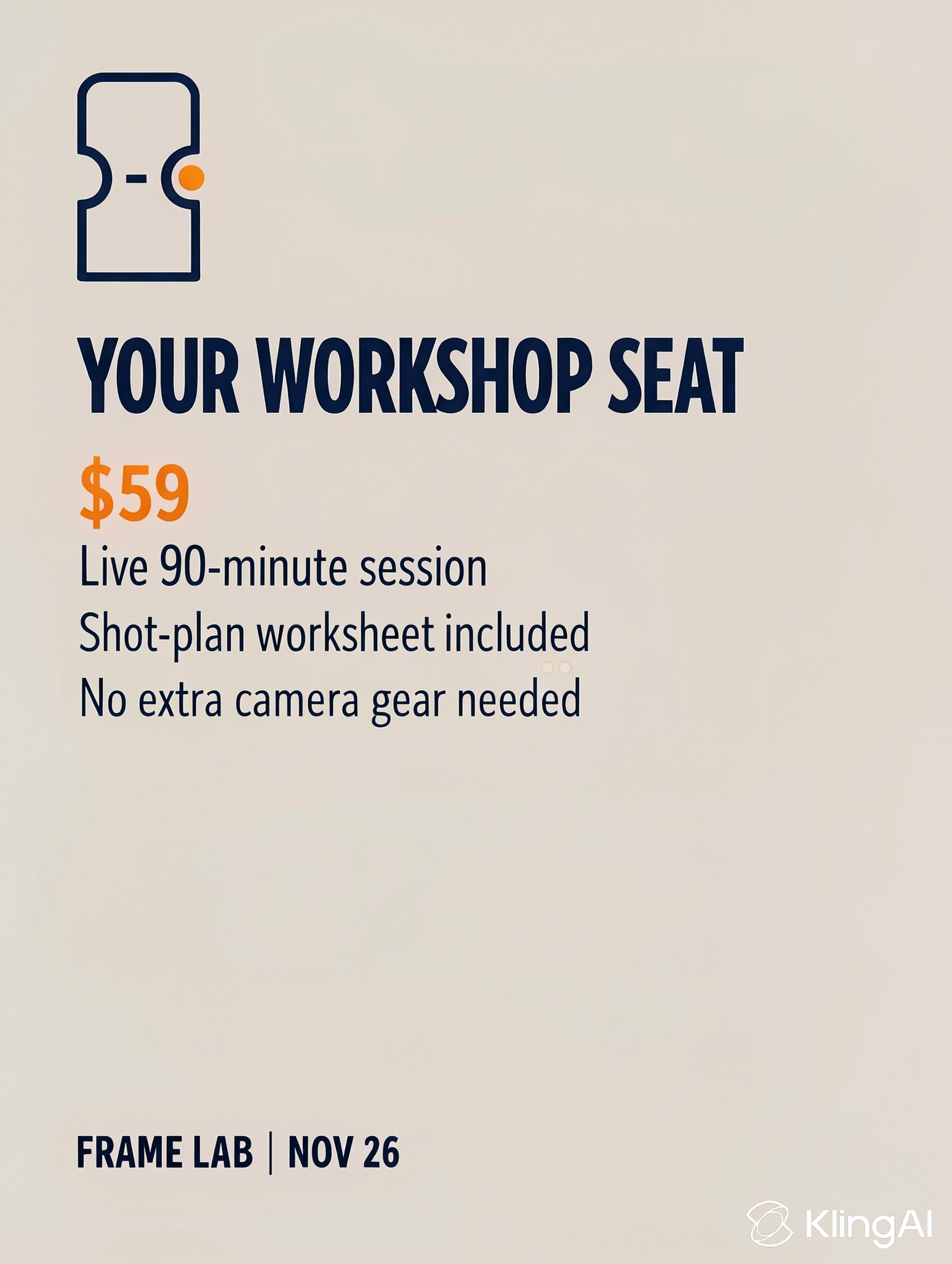
The new price is lighter, and you can see small changes in the letter edges and paper texture. The other words are still readable and the faint rings near the bottom line are still there. Put the new image next to your saved original so you can catch changes outside the number.
In the earlier set, the untouched booking slide read BOOK YOUR SEAT - $49. If you use that slide after the new offer, someone can swipe from $59 to $49 and wonder what they’ll pay.
Before you post, check the new price on both slides, in your caption and on the checkout page. The five slides above still use $49 on the offer and booking slides.
Download the files and inspect the handoff
Put the five PNGs you’re about to post in one folder, then open them in order on your phone. If your layout needs an exact 3:4 canvas, check the file properties and preview the crop. The downloaded Frame Lab slides measured 1760 × 2336, slightly off the 3:4 preset.
Look in the corners of the files you’ll send. The original Frame Lab slides show an AI-generation label and a KlingAI watermark. The edited $59 slide still has the watermark, with no top-left label. Check what your client will see and confirm the terms for the intended use.
Download the filled-in slide check (CSV) for the five carousel slides and both versions of the edited offer.
Your final delivery check
Fill this in with the five files you plan to post. If you’ve replaced a slide, check the new filename before you add it to the set.
CAROUSEL DELIVERY CHECK
Project / version:
Approved offer / brand / date / price:
Required canvas size:
| Page | Headline + body + CTA | Brand / date / price | Visual role / style | File opened | Fix needed |
|---|---|---|---|---|---|
| 01 | |||||
| 02 | |||||
| 03 | |||||
| 04 | |||||
| 05 |
Scroll horizontally to read all columns.
ACROSS THE SET
What each slide adds to the story:
Recurring props, person and style checked:
Small unintended marks checked:

AFTER AN EDIT
Requested change / every affected page:
Each price checked against the final offer:
Caption / booking destination price checked:
Surrounding words, artwork and labels compared with the saved original:
Revised files downloaded; old versions excluded from handoff:

FINAL FILES
Count and order:
Dimensions / format / crop preview:
Visible labels and watermarks accepted:
Usage rights and delivery requirements checked:
Remaining fixes / deliver or rebuild:
I’d use Kling to draft the carousel, then make the final fixes before posting. For Frame Lab, that means keeping the mug story and workshop copy, simplifying the repeated phone frames, and replacing the storyboard on the offer slide. If the price changes, the edit is only done once the slides, caption and checkout agree.
Sources and test notes
- Kling Image 4.0 User Guide. Official documentation for image sets and generation modes. Checked November 18, 2026.
- Kabo’s Frame Lab workshop results. Free web account, November 18, 2026. Two five-slide generations at 20 bonus credits each and one edit at 3.
- Runware image-series guide. An API tutorial with a five-page slide-deck example.