
More tool calls don’t automatically make a better idea. We’ll start with the audience and what we can show, then collect the smallest useful evidence set. A cycling creator with apartment footage is our example of turning a familiar constraint into a fresh, filmable question.
Kabo, an AI agent for creator research, supplies video, comment and optional analysis evidence. We’ll connect each piece to a particular viewer question before proposing the original brief.
Choose the client and confirm the connection
Connect https://kabo.sh/mcp-pub in a compatible client and complete Kabo sign-in. The MCP setup guide covers the connection; installation options are available for Codex and Claude Code.
Pick Codex or Claude Code if the brief should live beside our assets. A compatible chat client is enough for a copyable brief. State that choice in the opening request so the assistant doesn’t promise a file it cannot save.
Prepare the materials for this MCP task
[ ] Audience brief — Who we help and one decision or obstacle.
[ ] Owned-assets list — Clips, demonstrations, products and access we actually have.
[ ] Previous titles — Ideas already covered or deliberately deferred.
[ ] Research scope — Platform, dates and relevance rules.
[ ] Output choice — Local brief if the client supports files; copyable text otherwise.
Choose evidence for a particular viewer question
Our cycling creator wants to help commuters keep a small entryway workable. We have hallway footage and an actual arrival routine. Start by asking what evidence could change that brief.
Candidate videos may reveal relevant topics. Comments may add a question if the ready tools can retrieve them. Analysis is optional when a specific mechanism needs inspection; it should not become a default large job.
Given [viewer question], [owned assets] and [constraints], inspect ready Kabo tools. Explain which evidence could change this brief and choose the smallest collection. State whether video candidates are enough or a linked comment sample or specific analysis would add necessary information. Propose any new saved analysis separately and wait for confirmation.
Keep source observations and viewer questions linked
For each video observation, retain its actual source. For a comment question, retain the video it belongs to and the sample context. Our editorial proposal gets a different label. That prevents a useful but unrelated comment from becoming evidence for the wrong concept.
Build a brief with an evidence chain
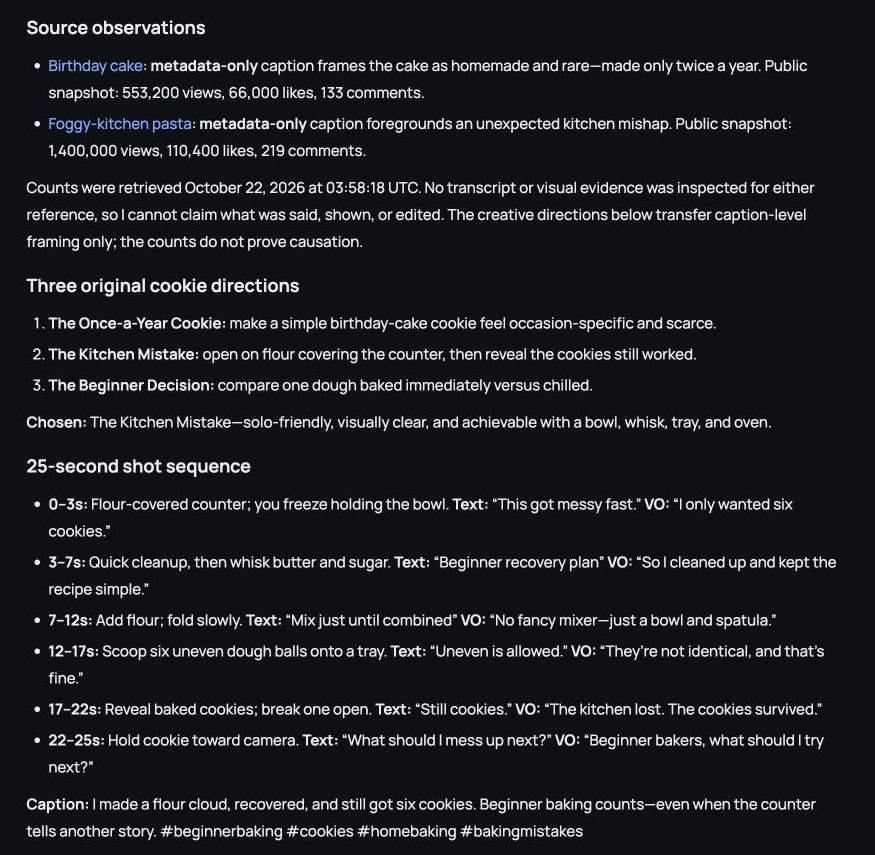
Use a small map: source observation → supported viewer question → our proposed contribution → proof to film. The arrow from evidence to proposal is a reasoning step, not another fact Kabo returned.
For our commuter example, the original contribution is the routine we actually perform and can demonstrate. A general popularity signal does not establish that our hallway solution will work for every home.
Using only the accepted source records, build a compact evidence chain for each proposed angle: source observation and URL, linked viewer question if available, our editorial interpretation, original contribution and proof we must film. Do not invent comment support or claim the reference mechanism was observed if evidence is metadata-only. Identify missing links before recommending an angle.
An authored brief with its claims separated
For a rainy-ride arrival video, the map could be:
- Source observation: attach the relevant actual reference and what its available evidence establishes.
- Viewer question: a retrieved question with its parent video, or explicitly our own audience hypothesis.
- Our proposal: show what comes inside after a wet commute.
- Our proof: film our entryway, bag and cleanup routine.
- Open check: whether the sequence clearly answers the storage problem.
If no relevant comment was retrieved, the hypothesis can still be a useful editorial choice. It simply should not be labeled comment-backed demand.
Check the claim we will put in the brief
Ask which sentence overstates the evidence. “A question appeared in our sample” is different from “commuters all want this.” The final brief can retain a promising idea while reducing an unsupported claim. Check production fit and previous titles after that evidence review.
Return the selected brief and the unresolved links
Give the client a clear output destination: local Markdown through authorized file access, or copyable text. The handoff includes the chosen question, original proof, actual sources and remaining checks. A rejected evidence link belongs in the note so the next revision does not silently restore it.
No relevant comment was retrieved for this angle. Keep it as our editorial hypothesis if it still fits the audience and owned footage, but remove the comment-backed demand claim. Update the brief’s evidence chain, identify what we can test in our own demonstration and retain the source observations that are actually supported.
Take the selected proof requirement into filming
Use the Reels discovery recipe to refresh an Instagram source set, or the Muse ideas guide for a more conversational angle-comparison session. Once our selected brief has a clear proof requirement, take the owned footage into CapCut or the editor we already use.
Worked examples are illustrative. Product screenshots show existing Kabo web results, not a run of the example in this guide. Use your own materials and the evidence returned in your task.