
Choose an Instagram analytics tool by the task
| Tool | Best for | Accounts to analyze | Free access / starting price |
|---|---|---|---|
| Instagram Insights | Understand how your content and profile performed | Your professional account | Free |
| Metricool | Review results and manage your publishing calendar together | Connected accounts; competitor setup required | Free plan; Starter US$20/mo, billed annually |
| Not Just Analytics | Inspect a reference account and its recent posts | Public profiles | Public lookup; Light €190/year + VAT |
| Socialinsider | Follow public accounts and prepare recurring comparisons | Public competitor profiles; connected own accounts | 14-day trial; Adapt US$99/mo |
| Kabo | Understand content patterns and develop your next idea | Public accounts and post references | Free daily credits; Pro for more usage |
Written by Kabo. These picks serve different creator tasks; their order is not a performance ranking.
The 5 best Instagram analytics tools for creators
1. Instagram InsightsYour own performance
FreeUse Instagram Insights to see how your own posts and profile performed. The professional dashboard we checked separated views, viewers, interactions, accounts engaged and profile activity, including follower/non-follower breakdowns.
Open Professional dashboard → Insights for the account view, or a post’s own insights for that piece of content. Compare similar formats and give newer posts time to develop. For research into someone else’s account, use a public Instagram account audit or one of the tools below.
Plans and starting point: Free with a professional account you manage; private reports require account access.
2. MetricoolAnalysis and scheduling
Free planMetricool combines account analytics, competitor monitoring and a publishing calendar. It fits a weekly workflow where reviewing results leads straight into scheduling the next posts.
Connect Instagram for your account reports. Its competitor setup guide requires a Facebook-linked Instagram connection for competitor monitoring. The Free competitor demo has fixed slots, so choose a reference set you intend to keep.
Plans and starting point: Free: one brand, 20 scheduled posts/month and 30 days of analytics. Starter: US$20/month billed annually or US$25 month to month, before tax.
3. Not Just AnalyticsQuick public-profile checks
Public lookupEnter a public handle to inspect its profile and recent content without connecting an account you manage. Our Preppy Kitchen lookup showed follower and post totals, average likes/comments, and a Latest content table with dates, formats and interactions.
Use it for a quick reference check: the twelve entries included older posts, so the table was not a fixed monthly report. Deeper analysis was gated. For a standalone calculation, use an engagement-rate calculator.
Plans and starting point: Public lookup worked without login; summary ER and detailed analysis were gated. Light: €190/year + VAT, with three smart analyses/month. Standard adds automatic reports and Reel/caption analysis.
5. KaboConversational account analysis
Free creditsKabo’s AI Agent lets you ask about a public account, examine the supporting posts and continue into ideas or writing in the same conversation. This suits a creator who can see the numbers but still needs to decide what to make.
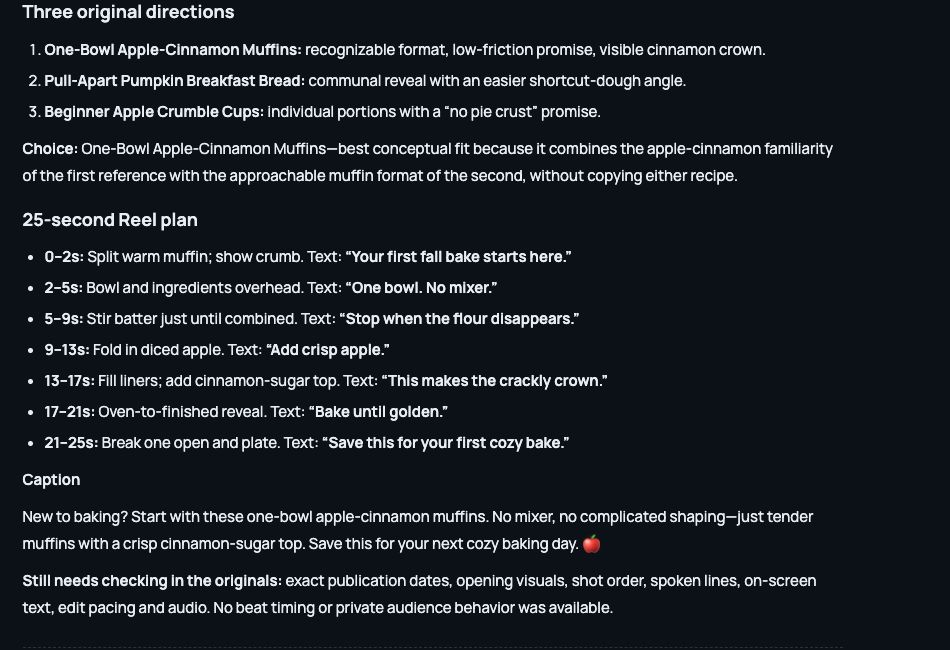
For Preppy Kitchen, it identified seasonal baking themes and a repeated cookbook-launch message. We then used caramel apple monkey bread and cinnamon swirl pumpkin muffins as references for a one-bowl muffin concept and 25-second shot plan. The plan was a creative proposal, not a measured result.
Choose conversational account analysis for an idea you want to question and develop. Keep native Insights for your own performance and a reporting tool for recurring charts.
Plans and starting point: Free daily credits; Pro adds more daily usage. Public research does not reveal another creator’s private Insights.
How we checked
Reviewed October 19, 2026. We checked Instagram’s professional dashboard, NJA’s public lookup, an existing Socialinsider trial, Kabo conversations and Metricool’s Free setup. Metricool’s connected reports and Socialinsider’s paid AI were not tested. Official documentation supplements these results. Samples and reporting periods differed; this is a task-based comparison, not an accuracy ranking.
Instagram analytics tools FAQ
Can I analyze a competitor without connecting my own account?
NJA’s public lookup, Socialinsider’s public-profile reports and Kabo’s research support this. Metricool requires your own Facebook-linked Instagram connection. Public research does not expose owner-only Insights.
Why do engagement figures differ between tools?
Tools may use different dates, post samples, formulas, estimates and refresh times. Match formats, periods and the rate’s denominator before comparing percentages.
When is a paid tool useful alongside Instagram Insights?
Pay for a recurring need: multi-account reports, competitor history, client exports or scheduling. If your bottleneck is deciding what to make, try a research-to-idea workflow first.
Building your reference set? Find comparable Instagram accounts before choosing which profiles to follow regularly.
4. SocialinsiderCompetitor reports
Free trialSocialinsider fits recurring competitor reviews. Its content and Reels views let you move from account totals to the posts behind them. Our Preppy Kitchen report grouped ten Reels with original links, dates, captions, likes and comments.
Reporting options include CSV, XLS, PDF and PPT. Keep the account set and reporting period consistent for client or team reviews, and read competitor reach and views as estimates, as its metric guidance explains.
Plans and starting point: Adapt: US$99/month or US$990/year, up to 20 profiles; 14-day trial. Our report used an existing trial; paid AI required an upgrade.