
AI can fill a page with video ideas in seconds. The harder part is finding one that fits our audience, adds something new and doesn’t require a production budget we don’t have.
We’ll use Kabo, an AI agent for creator research, through its Codex plugin to bring public content research into the same task as our own materials. Then we’ll turn a short list of ideas into a brief we can produce from.
This works across YouTube, Instagram Reels and TikTok. Pick a platform and format for each research pass. The travel example later is just a demonstration; the same steps apply to teaching, reviews, cooking and other creator niches.
1. Give Codex a useful starting point
Start with what someone should get from watching us. “People interested in cooking” is broad. “First-time home cooks who want to understand why a recipe failed” gives us a real problem to work on.
Create a small project folder with your notes and available materials. Copy the checklist below into a note, fill in what you know and delete what doesn’t apply. Filenames are suggestions; we don’t need a polished brand deck to start.
Open the folder as a local project. Plain notes are enough; existing footage is useful, but we can also develop a new shoot. The Codex creator workflow shows how to organize a larger project when we need one.
[ ] creator-brief.md — Audience: [who]. Viewer problem: [what]. Platform / format: [where / length]. Our perspective: [what we add].
[ ] recent-posts.md — 5–10 titles or links; topics we’ve already covered. New account? Add 2–3 reference creators instead.
[ ] original-proof/ — Our tests, lesson notes, product experience or first-hand observations.
[ ] available-assets.md — Footage, photos, screen recordings and props, with filenames and what each shows. No footage yet? List what we can shoot.
[ ] voice-and-limits.md — One writing sample, time / budget, and what we can’t film.
[ ] open-checks.md — Missing assets, facts to verify and permissions to confirm.
2. Connect Kabo for fresh research
Install the Kabo plugin in Codex, complete sign-in and open a new task after authorization so the tools refresh. Ask Codex to check that Kabo’s research tools are ready.
Now we can research public videos and creators alongside our own brief. Start small: we want relevant sources before a large report. If a needed capability isn’t available, narrow the task and keep that limitation visible.
3. Research the question before the title
“Find viral videos” is a pretty loose brief. Ask instead: what are relevant creators helping viewers solve, and where can we contribute something useful?
A software educator might investigate setup problems; a reviewer might research confusing product tradeoffs. Choose one platform, format and publication window so the examples are comparable.
Remove irrelevant examples. Where recent same-account context is returned, use it alongside public counts; leave missing baselines unresolved. A popular reference is a clue, not a forecast for our video.
Need a deeper pass? Follow the YouTube research workflow, use public comments to find unanswered questions, or compare competitors’ content choices when positioning is the real question.
Read creator-brief.md and recent-posts.md first. Use Kabo to find up to 6 relevant public videos on [platform], in [format], published between [start date] and [end date], about [viewer problem].
Return a short source list: URL, creator, date, viewer question, available public metrics and what we could add. Keep missing data explicit. Separate observations from interpretations; don’t infer retention from view counts. Show the sources before proposing ideas.
4. Ask for three ideas with a reason to exist
A topic is “spreadsheet organization.” An angle is “three layout decisions that make a shared sheet understandable to the next person.” Now we can picture a problem, a demonstration and a payoff.
Judge each idea on three things: does our audience need it, what do we add, and can we make it? If it requires a product we can’t access or repeats our last post, revise or park it.
Choose the idea before polishing its title. For a YouTube version, the title generator can help explore wording once the promise is clear.
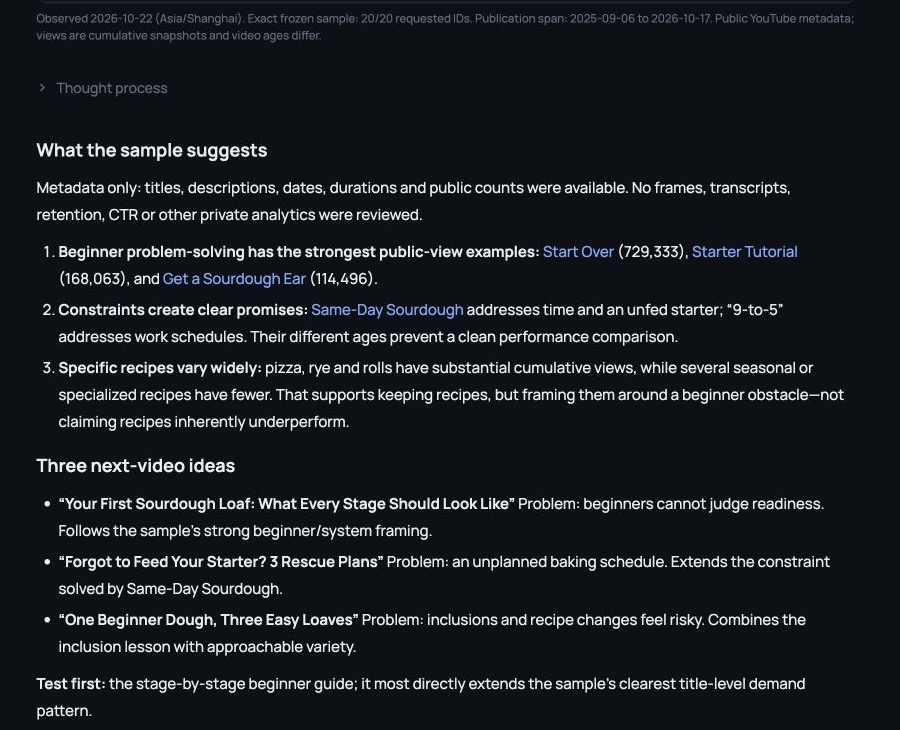
Using our project notes and the sources we just reviewed, propose 3 original video ideas. For each, give: viewer question, working title, our angle, evidence we can demonstrate, assets needed and production effort.
Explain how it differs from our recent posts and the reference videos. Don’t invent test results or assume we own footage. Recommend one idea we can make within [time / budget], explain why, and flag any open checks. Don’t write full scripts yet.
A quick example: choosing a travel video
Suppose we help first-time travelers plan city breaks. We’ve published a Lisbon guide and have a rainy walk, tram-queue footage and apartment-kitchen clips. We can record a voiceover, but not another trip.
After researching relevant viewer problems, we could develop these illustrative concepts:
- “Our Lisbon Plan Changed When It Rained.” Explain our actual planning decisions using the rainy footage and trip notes.
- “The Tram Queue I’d Plan Around Next Time.” Explore a decision through our own visit, checking any current transport details separately.
- “What a Tiny Apartment Kitchen Changed About Our Trip.” Show the convenience and tradeoffs with our own cooking footage.
We’d pick the strongest match between audience need and our proof. These are authored examples, not reported trend findings. A teacher would bring a lesson demonstration; a reviewer would bring a test. The process stays the same.
5. Give one correction that changes the idea
Maybe the first pass promises a complete guide when we can show only one decision. Pull it back:
Check the revision. Did Codex reduce the scope or identify the missing demonstration? Fresher adjectives won’t fix an unclear idea.
If format is the open question, request a short demonstration and a longer explanation of the same concept. Compare what each needs. Once an opening and footage exist, the video hook workflow helps check whether the promise matches what we deliver.
Revise idea [number]. Keep the viewer question, but narrow the promise to one result we can demonstrate using our available assets. Remove sections that need footage, products or access we don’t have.
Show the revised promise, opening, 3 main beats and any remaining asset gaps. Explain what changed and why.
6. Save a brief we can produce from
The next output is a production brief, not another pile of titles. Save it in the project so we can reopen it before writing or recording. For a software educator, that means naming the demo sheet, the confusing layout to show and the three changes we’ll demonstrate.
Continue with the script-writing workflow when we need narration and visual notes. Finish in our usual editor; CapCut is one option for assembling clips, voiceover and captions.
Keep the other ideas with a note about what they need. When several are ready, the content-calendar workflow helps plan writing, filming, editing and review. For now, one clear idea and its next action are a useful result.
Turn idea [number] into video-brief.md in this project. Include: audience, platform / format, viewer promise, original angle, opening, 3 main beats and source links.
Add an asset checklist with each filename, where it will appear and what still needs recording. List facts to verify and the next 3 actions. Use placeholders for missing material; don’t invent evidence. Show me the brief before we move on to scripting.
The worked examples illustrate the process. Use your own materials and actual research results when you run it.