
Connect and manage your Instagram or TikTok account
Add a public profile, confirm the account, and understand what changing or disconnecting it does.
Updated October 21, 2026You’ll need: A signed-in Kabo account and a public Instagram or TikTok username or profile link.
On this page
What connecting an account means
Kabo reads the account’s public profile and videos. You do not need to give Kabo your social account password. This is not a connection to private Instagram Insights or an authorization to publish posts.
You can connect one account per supported platform. Connecting an account does not make private content publicly available.
Connect a profile
Open Connected accounts.
In Web Agent, open your account menu and choose Connected accounts. A + Connect entry in a workspace also opens the account panel.
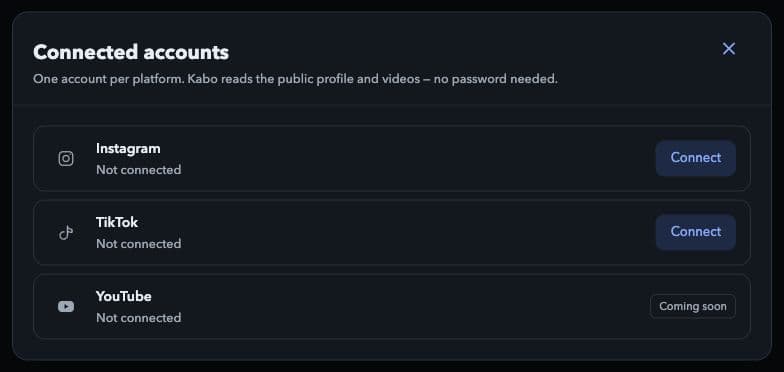
Choose Connect next to Instagram or TikTok. Local interface preview · Kabo Web Agent 44f3bda4. Open image to enlarge. Choose Instagram or TikTok.
Select Connect for the platform, then enter the username or public profile link requested by the form.
Confirm the matching account.
Check the returned profile before confirming. If it is not yours, correct the input rather than accepting a similar username.
Open Profile or Videos.
Allow the account data to load. Connecting and completing an account review are separate operations; an accepted profile does not mean a review is already finished.
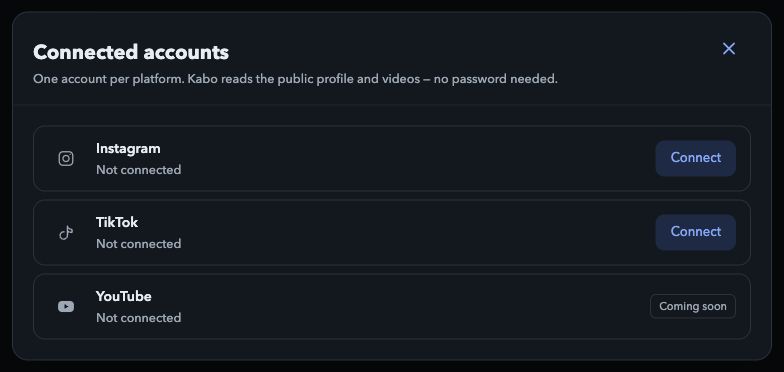
Change a connected account
In Connected accounts, choose Change for the platform and complete the same profile confirmation flow for the replacement account. Because only one account per platform is connected, this is a replacement, not an additional account.
If the panel says the account changed on another device, use the refreshed list and check which account is now connected before trying again.
Disconnect an account
Choose Disconnect.
Find the connected account and select Disconnect.
Read the confirmation.
Kabo stops reading the account and removes it from Videos and Profile. Its review, drafts, scripts, and saved videos stay, and nothing is deleted on the social platform. Connect the same account again and its review comes back.
Confirm only if that is what you intend.
Disconnecting is different from deleting your Kabo account or deleting content on the social platform. If you change your mind, choose Undo in the panel within 8 seconds.