
Understand your account review
Read your baseline and turn an account diagnosis into a specific next step.
Updated October 21, 2026You’ll need: A connected public Instagram or TikTok account. The review needs enough retrievable public data to complete.
On this page
Open the account review
Open Profile.
Select the connected platform you want to review. If there is no account, connect one first.
Choose Analyze when you need a review.
Keep an eye on the review state while Kabo reads posts, measures a baseline, and writes the review.
Read the completed report.
A connected profile, a running review, and a completed review are different states. Wait for the result before drawing conclusions.
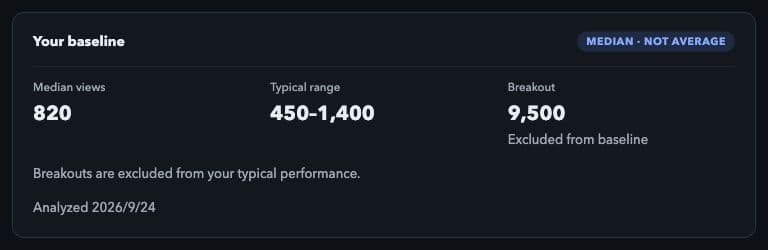
Read the baseline alongside the completed review. Example report: the numbers and analysis date shown are sample data, not results from a live account. Local interface preview · Kabo Web Agent 44f3bda4. Open image to enlarge.
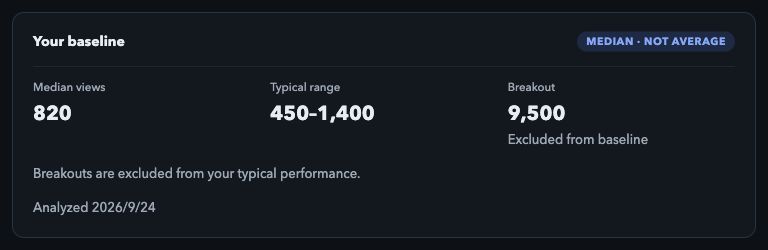
Read your baseline
Your baseline gives context for comparing posts within the account. Median views represent the middle of the sampled view counts; they are not the same as an arithmetic average.
The report also shows a typical range and a breakout figure where available. Read the explanation alongside the numbers: a breakout is marked as excluded from the baseline, so an unusually large result does not define the everyday comparison.
Turn the review into an action
Read the summary and supporting observations.
Check the reported strengths and weaknesses against the posts the review describes. Do not treat a suggestion as proof that one factor caused a result.
Choose one change to test.
Use a specific suggestion to shape your next video or script rather than changing every part of your workflow at once.
Ask a focused question.
Choose Ask Kabo for the account, review the prefilled question, and ask for a concrete example or explanation.
If the review does not finish
Use the retry action shown in the failed review. If the profile itself will not load, check that the account is still connected and publicly accessible.
An absent report or missing number is not a zero result. If retrying does not help, contact support with the platform, time, and exact error text.