
Understand and check your Credits
Find your balance and tell Regular Credits from Video Credits.
Updated November 5, 2026You’ll need: A signed-in Kabo account.
Open your balance
Open the account menu in Web Agent and choose Credits. Check the remaining balance and any usage details shown. Web and desktop share a balance for the same Kabo account; check which account is signed in if the numbers look different.
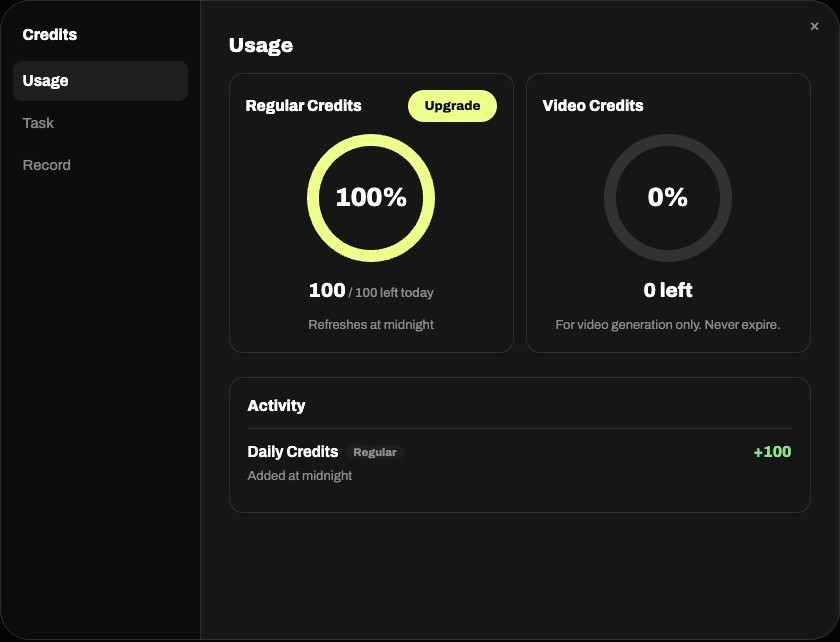
Know which Credits a task uses
Regular Credits and Video Credits are separate balances. Check the notice for the action you are taking, especially before video generation. Daily allowances, rewards, and purchased balances can have different rules. Read your current account’s breakdown and reset information rather than assuming every balance renews daily.
When a task is blocked
Use the plan or Credits options offered for your account. If the balance cannot load, check your connection and sign-in first; missing data is not a zero balance. Repeatedly retrying does not bypass a limit or guarantee a refund. For a disputed charge, contact support with the task, time, and error message.